

• About   |
  • Submit Guest Post |
  • Contact Us
No Result
View All Result
The Second Angle (TSA Magazine)
Advertise
  • Infotainment
    • Sports
    • People
    • Inspiring
  • Entertainment
    • Lifestyle
    • Home & Decoration
  • Buzz
  • Education
  • Travel
  • Finance
  • Healthcare
  • Technology
The Second Angle
No Result
View All Result
  • Infotainment
  • Entertainment
  • Buzz
  • Education
  • Travel
  • Finance
  • Healthcare
  • Technology
Advertisement
ADVERTISEMENT
Home Technology

How To Change Your LinkedIn URL: Step-By-Step Guide To Customize Your Profile

LinkedIn is one of the most prominent social platforms to build a virtual professional network. Here is an easy guide on how to change your LinkedIn URL.

by TSA Desk
March 25, 2023
in Technology
Reading Time: 3 mins read
How To Change Your LinkedIn URL: Step-By-Step Guide To Customize Your Profile

Flex jobs

Share on FacebookShare on WhatsApp
Advertisement Advertisement Advertisement
ADVERTISEMENT

In recent times, LinkedIn has surged as a gateway to finding jobs, learning professional skills, career development, and connecting with various job providers. Thus, a decent LinkedIn profile is the need of the hour for career-oriented exposure. To set up a good LinkedIn profile you may have to edit the profile URL to give it a more approaching and professional look. In this post, we present you with an easy guide on how to change your LinkedIn URL.

LinkedIn could be put in the genre of social media but a more formal one and when you are stepping up into a professional space, you do need to have a formal presence out there.

LinkedIn offers everything from jobs and education related to having you updated with opportunities and skills. Your profile on such a platform is possibly an e-resume. Many ways are using which you can have a firm professional presence on LinkedIn and changing the profile URL is one of them.

Table of Contents
  • Changing LinkedIn Profile URL on Desktop
  • Changing LinkedIn Profile URL on Mobile

Changing LinkedIn Profile URL on Desktop

To change the profile URL on a desktop, all you need is a decent internet connection and a web browser with LinkedIn open on it.


RelatedPosts

7 Conspiracy Theories That You Would Definitely Want To Believe In

Can You Download Videos From Facebook?

7 Most Futuristic Concept Cars in the World

7 Most Futuristic Concept Cars in the World

Step 1: Open the LinkedIn website on your web browser. Now, Sign in with your account details.

Step 2: On the top right corner, you will find a drop-down icon just behind the Me option. Tap and open down the icon, and now select the View Profile option.
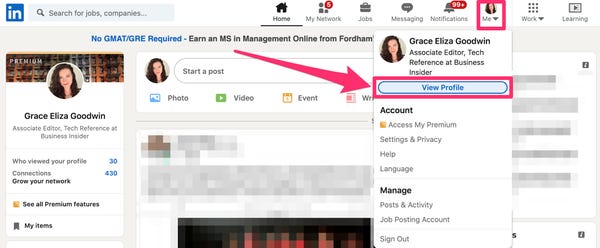
How To Change Your LinkedIn URL: Step-by-step Guide To Customize Your Profile
image source: business insider

Step 3: You can easily find the ‘Edit public profile & URL’ right there. Click on it.
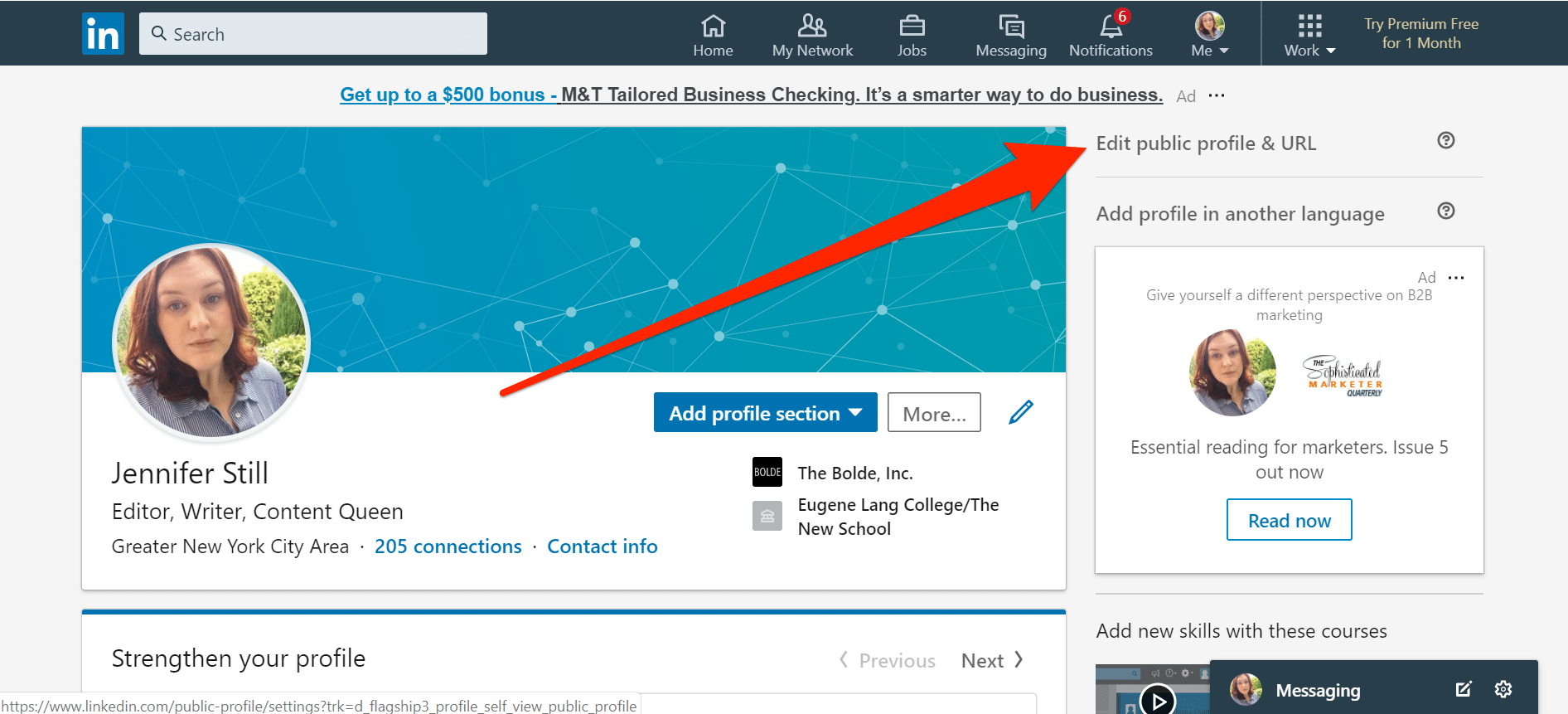
How To Change Your LinkedIn URL: Step-by-step Guide To Customize Your Profile
image source: business insider.in

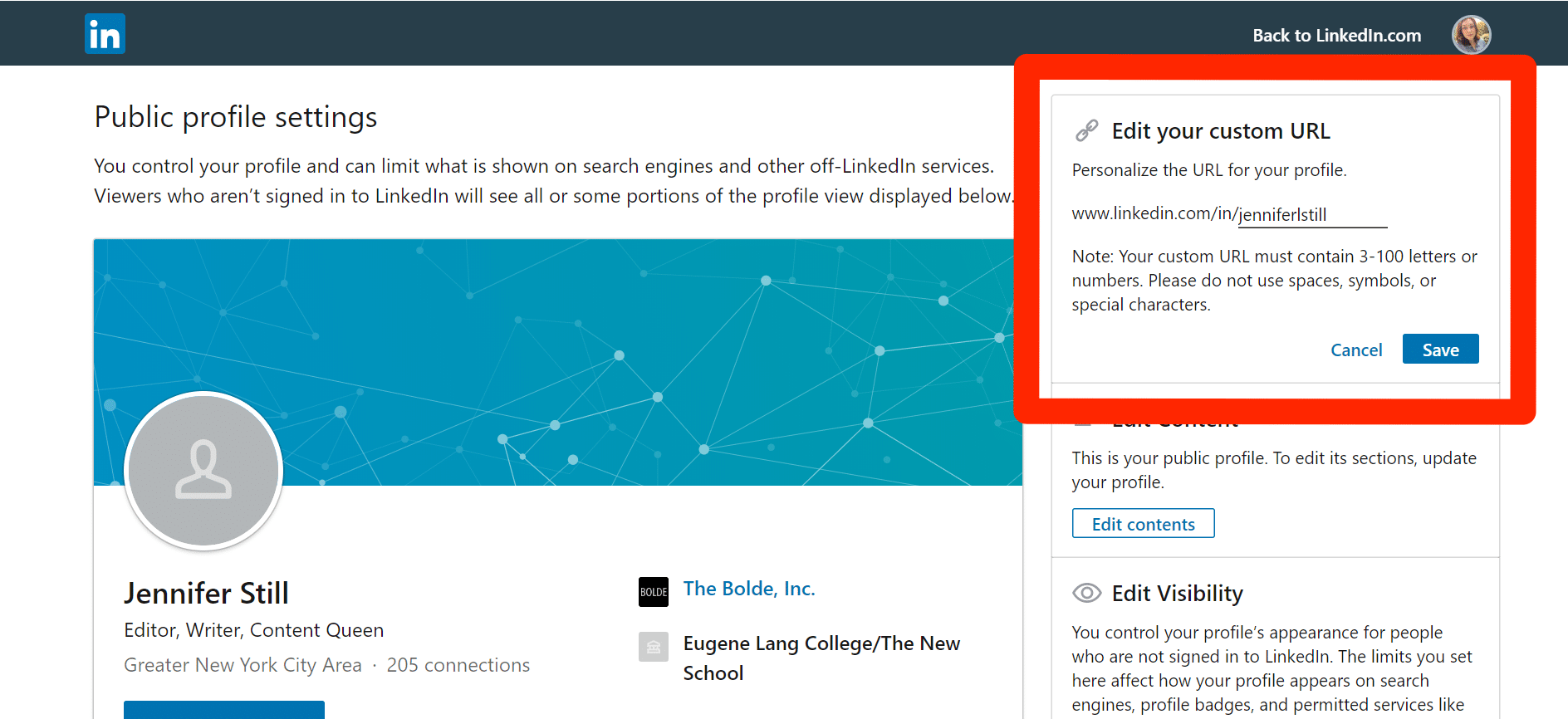
Step 4: Now you have your system-generated profile URL in front of you with a Pencil icon behind it. Click on the Pencil icon to edit the URL.
How To Change Your LinkedIn URL: Step-by-step Guide To Customize Your Profile
image source: business insider.in

Step 5: Clear the existing URL and you are all set to input the new URL of your choice. Tap on Save when you are done and that’s it! your LinkedIn profile URL is now changed.

Changing LinkedIn Profile URL on Mobile

LinkedIn is also available in a mobile app version which is very much accessible from smartphones. Here are the steps to change your profile URL on the mobile app. All you need is the LinkedIn app downloaded on your smartphone.

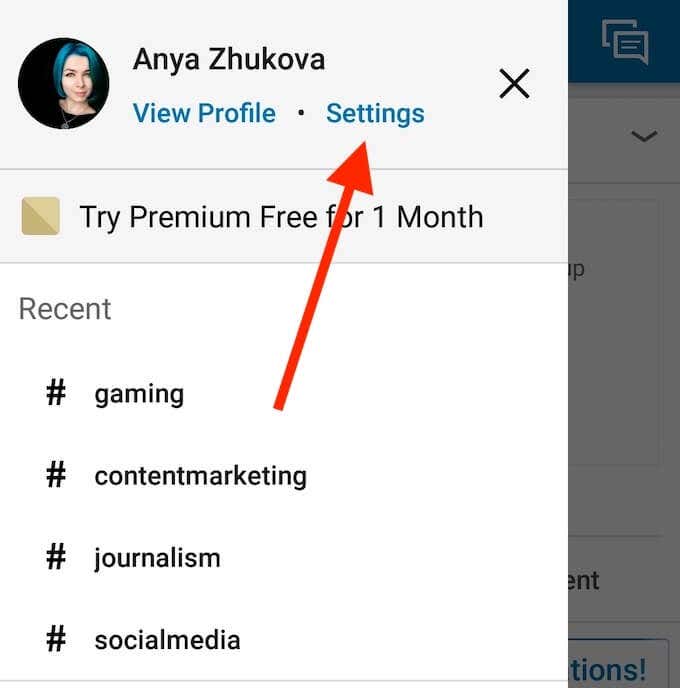
Step 1: Open the LinkedIn application on your Android or iOS-backed smartphone. Tap on the profile picture at the top of the left-hand side corner.

Step 2: You will find the View Profile option around your profile picture and name. Tap on it to proceed.
How To Change Your LinkedIn URL: Step-by-step Guide To Customize Your ProfileHow To Change Your LinkedIn URL: Step-by-step Guide To Customize Your Profile
image source: helpdeskgeek

Step 3: Scroll down till you have the Contact section in front of your eyes where you have to tap on the Edit (Pencil) icon.

Step 4: Now, tap on the existing profile URL which will be followed by a LinkedIn in-app pop-up.
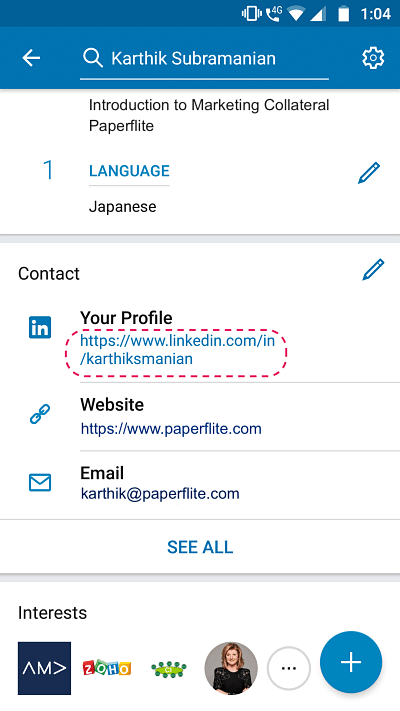
How To Change Your LinkedIn URL: Step-by-step Guide To Customize Your Profile
image source: paper-flite

Step 5: Under the Edit your custom URL option you will find a Pencil icon beside the default URL. Click on that Pencil icon.

Step 6: Now type the new URL of your choice in the text tab just beside the Personalize the URL for your profile option. Tap on the Save button and voila! it’s done.

Your LinkedIn profile URL is now changed.

Also check out: Vivo V23 Pro 5G Review

ShareSendTweet
Previous Post

Movie Defined By Its Songs– Kal Ho Naa Ho

Next Post

Pope expands sex abuse law, reaffirms adults can be victims

Related Posts

7 Conspiracy Theories That You Would Definitely Want To Believe In
Technology

Can You Download Videos From Facebook?

500 million people view millions of videos on Facebook every day. Some Facebook users wish to save their favorite videos...

Read moreDetails
7 Most Futuristic Concept Cars in the World
Technology

7 Most Futuristic Concept Cars in the World

Concept cars are no longer only a showpiece to draw attention to an automotive company. This is true technological brilliance....

Read moreDetails
What Makes GPT-4 Unique From ChatGPT And How Is It Different?
Technology

What Makes GPT-4 Unique From ChatGPT And How Is It Different?

With inception of new versions and other competitive AI chatbots, there arises a question — What makes GPT-4 Unique From...

Read moreDetails
20 Most Amazing And Genius Product Packaging Designs Ever Created
Technology

20 Most Amazing And Genius Product Packaging Designs Ever Created

The majority of our items are packaged in some style. Certain products don't require as much packing because customers will...

Read moreDetails
7 Most Expensive Cars In The World
Listicles

7 Most Expensive Cars In The World

Cars have been defined as a symbol of both luxury and status. While most of us are using our cars...

Read moreDetails
Top Examples Of Interactive Marketing & How Brands Can Make The Most Of It
Business

Top Examples Of Interactive Marketing & How Brands Can Make The Most Of It

In today's fast-paced digital age, companies must continually find new ways to engage with consumers. One increasingly popular approach is...

Read moreDetails
Load More
Next Post
Pope expands sex abuse law, reaffirms adults can be victims

Pope expands sex abuse law, reaffirms adults can be victims

Important Links

  • About
  • Guest Post
  • Privacy Policy
  • Terms
  • Contact Us
  • Newsletter

© 2017-23. The Second Angle. All Rights Reserved. Developed and Managed by SquareBase.io

Welcome Back!

Login to your account below

Forgotten Password?

Retrieve your password

Please enter your username or email address to reset your password.

Log In
No Result
View All Result
  • Infotainment
    • Sports
    • People
    • Inspiring
  • Entertainment
    • Lifestyle
    • Home & Decoration
  • Buzz
  • Education
  • Travel
  • Finance
  • Healthcare
  • Technology

© 2017-23. The Second Angle. All Rights Reserved. Developed and Managed by SquareBase.io

This website uses cookies. By continuing to use this website you are giving consent to cookies being used. Visit our Privacy and Cookie Policy.