



Not so long ago, CamScanner used to be among the most downloaded apps on PlayStore. It was removed from the Play Store in the middle of 2019 due to not satisfying the policies.
CamScanner was indeed a handy scanning app but as we have to move on with time here are the best CamScanner alternatives that can help you with document scanning efficiently.
Looking for ideal document scanner applications for Android and iOS that can replace CamScanner, we are considering apps that work seamlessly and detect the edges automatically without putting a watermark around the scanned document, all of this without compromising the quality of the digital copy of your documents.
 Also read7 Best Grammarly Alternatives
Enlisted here, you can find the 8 best CamScanner alternatives for Android and iOS-
1. Adobe Scan
Coming from a company that has a very dominating legacy around document management, Adobe Scan is by far the best alternative to CamScanner. Adobe Scan delivers sleek and smooth performance with highly equipped document scanning features such as automatic edge detection, dedicated scans for ID cards, notes, and receipts, and various scanning modes and filters, all of them on your smartphone. The automatic edge detection helps in quick scanning while cutting out the unwanted background around the document. It scans and compiles your documents in one go.
Adobe Scan also allows scanning images and converting them into an editable format. It allows you to save and share documents in PDF and JPEG forms without applying watermarks or ads to them. You can also save your scans on their cloud freely with a sign-up and get back to them anytime anywhere.
Adobe delivers an ideal set of features that are also for free in this application and set the bar among the best document scanning apps already very high. In-app purchases are also available.
2. Microsoft Office Lens
Microsoft has an alternative for everything Office, as document scanning is one of the most desired official works, they do offer an app for the same called Microsoft Office Lens. Office Lens is another precisely equipped document scanner coming with Microsoft that promises to provide more to document scanning.
Along with seamless scanning, the app can detect whiteboard tables, diagrams, and handwritten notes very efficiently. You can also import your scans on the Microsoft Office ecosystem such as MS Word and PowerPoint.
Microsoft Office Lens is a great add-up for people who work extensively with Microsoft products. As mentioned in the list of CamScanner alternatives, Lens does more than similar things such as auto edge detection, document type detection, and OCR automatically.
Regular Microsoft Office users can easily import their scans through OneNote and directly save them on drive or cloud in both PDF or image form. The app is completely free.
3. Scanbot
Scanbot offers everything a decent document scanning application needs. It comes in handy to scan documents and create PDFs out of them. A very firm alternative to CamScanner it scans efficiently for a wide range of documents such as ID cards, notes, whiteboards, receipts, book pages, QR codes, and more.
The edge detection feature is on point and reads the edges of the document precisely to put a clear digital copy of it on screen. It also allows on-the-go editing with scanned documents.
Equipped with batch scan mode and OCR, the add-on feature of ScanBot is you can search files by looking for text in documents. It can save and export scanned documents in both PDF and JPG formats also integrated with various cloud services to save up your scans.
Scanbot is a great alternative to CamScanner. The app is free with paid options to avail of the premium version.
4. Evernote Scannable
Evernote Scannable delivers quality with its scans as the app can easily distinguish between various kinds of documents such as ID cards, receipts, whiteboards, etc. The edge detection feature is top-notch and easily reads out background depths.

Once you are done with the scanning, which is very seamless with the smartphone camera, the scans can be exported in JPG format in the camera roll or as PDFs in the internal storage.
The in-app cloud integration is smooth with easy sharing over email. Although it lacks OCR and annotation features, Evernote Scannable does a hefty scanning job just sleek and simple.
5. TurboScan
TurboScan is possibly the most lightweight in this list of CamScanner alternatives which does the job just simply. Being a very low-key scanner app it does a minimal job of scanning documents of various forms such as Xerox copies, whiteboards, handwritten notes, etc.
Not just that, TurboScan offers to save and export scanned documents in more than just PDF forms as they also enable PNG and JPG formats.
It allows you to share the scans directly through email or you can save it in Dropbox. It does have all the basic features such as edge detection, batch scanning, and compiling.
As we mentioned before, the easily built app lacks OCR but it still qualifies to be a decent recommendation in place of CamScanner. TurboScan is free with Android smartphones while iOS users need to pay to access this application.
6. Notebloc
Notebloc completes itself as a document scanner recommendation that can replace CamScanner with ease. To distinguish, it doesn’t put a watermark on your scans which was very evident in CamScanner.
Notebloc offers all the features with quality promises. The features include automatic edge detection, OCR, batch scanning, in-app cloud integration, automation, and document editing.
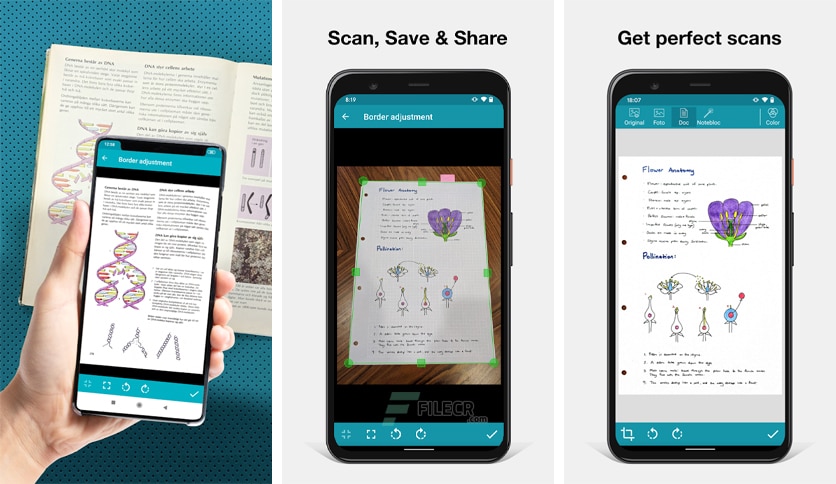
However, Notebloc is down the recommendation list due to lagging behind a bit with speed as the app is rather slow compared to the above-listed recommendations. The app is free on both Android and iOS with available in-app purchases.
7. TapScanner
TapScanner is an ultimate document scanner app that packs a huge lot of things just in one place. It is such a powerful application that we can rightly quote “With great power, comes great responsibility” for it.
TapScanner stands out with its very unique scanning feature that is it takes 3 simultaneous photos and creates a much more detailed scanned document using the compilation and detailing of all those 3 scans. As heavy as it sounds, it does deliver quality on your screens.

Equipped with more features such as edge detection, OCR, automation, and easy on-the-go editing tools, capable of exporting them in PDF, JPG, and PNG formats. Adding more to the worth of this app, you can digitally sign your documents with ease which is rare to TapScanner only.
It is enabled with everything required and much more which makes it a bit slow while processing but you are getting a powerful alternative to CamScanner with a compromise of just a few seconds.
8. Google Drive
As offbeat as it feels, Google Drive isn’t really a document scanner app, so what is this doing in a list of best alternatives to CamScanner? The doubt is real with many real reasons as answers. Google Drive does allow a decent built-in document scanning tool behind its “+” Plus button feature which many of us never really explored.
Just after you tap on the Plus button you will find an option of scanning any document or clicking an image. Although the built-in scanner is not very powerful, it does minimal work on the go.
Google Drive’s built-in scanner does offer features such as auto-crop detection and editing while you can scan any sort of document with it. As Google Drive is something most of us deal with every day in and out, what’s better to have a scanner tool built within the app. It does qualify to be a simple yet effective CamScanner alternative.
Also check out: 7 Best Grammarly Alternatives








