• About   |
  • Submit Guest Post |
  • Contact Us
No Result
View All Result
The Second Angle (TSA Magazine)
Advertise
  • Infotainment
    • Sports
    • People
    • Inspiring
  • Entertainment
    • Lifestyle
    • Home & Decoration
  • Buzz
  • Education
  • Travel
  • Finance
  • Healthcare
  • Technology
The Second Angle
No Result
View All Result
  • Infotainment
  • Entertainment
  • Buzz
  • Education
  • Travel
  • Finance
  • Healthcare
  • Technology
Advertisement
ADVERTISEMENT
Home Technology

How to Delete Microsoft Account – Step to Step Easy Guide

Do you want to know how to remove a Microsoft account since you no longer use it? You are most absolutely not alone. Here is an easy on How to Delete Microsoft Account.

by TSA Desk
March 15, 2023
in Technology, How to
Reading Time: 2 mins read
How to Delete Microsoft Account
Share on FacebookShare on WhatsApp
Advertisement Advertisement Advertisement
ADVERTISEMENT

Your Microsoft account grants you access to a variety of services, such as Outlook, Skype, Office, and Xbox Live. But, let’s face it: most, if not all, of them, have alternatives, and in some situations, those options are even better than what Microsoft has to offer. In this post, we present you with an easy guide on how to delete Microsoft Account.

Furthermore, canceling your Microsoft account is the greatest approach to secure your personal data if you are concerned about privacy.

However, before you proceed, ensure that you are prepared to terminate your Microsoft account – remember that you will lose access to your emails, Skype messages, and documents saved in your OneDrive account. 

How to Delete Microsoft Account - Step to Step Easy Guide
Image Source: arstechnica

If you own an Xbox, you will also lose your Gamertag, purchased games, and progress and achievements. You will also no longer have access to the funds in your Windows Store wallet.

Also, make sure you’ve canceled any subscriptions related to your Microsoft account before deleting it, as it might be difficult to cancel subscriptions when you can’t access the account to which they’re linked.

Table of Contents
  • How to Delete Microsoft Account

How to Delete Microsoft Account

  1. Log in to your Microsoft account and go to the account termination page. You may be required to validate the ownership of your account by receiving a code delivered to either your phone number or another email address linked with your Microsoft account.
  2. Review the account closure information before selecting the account recovery window. If you change your mind, you have this length of time to log back in and prevent your account from being destroyed. You can pick between 30 and 60 days. Then press the “Next” button.

    How to Delete Microsoft Account - Step to Step Easy Guide
    Image Source: top-password
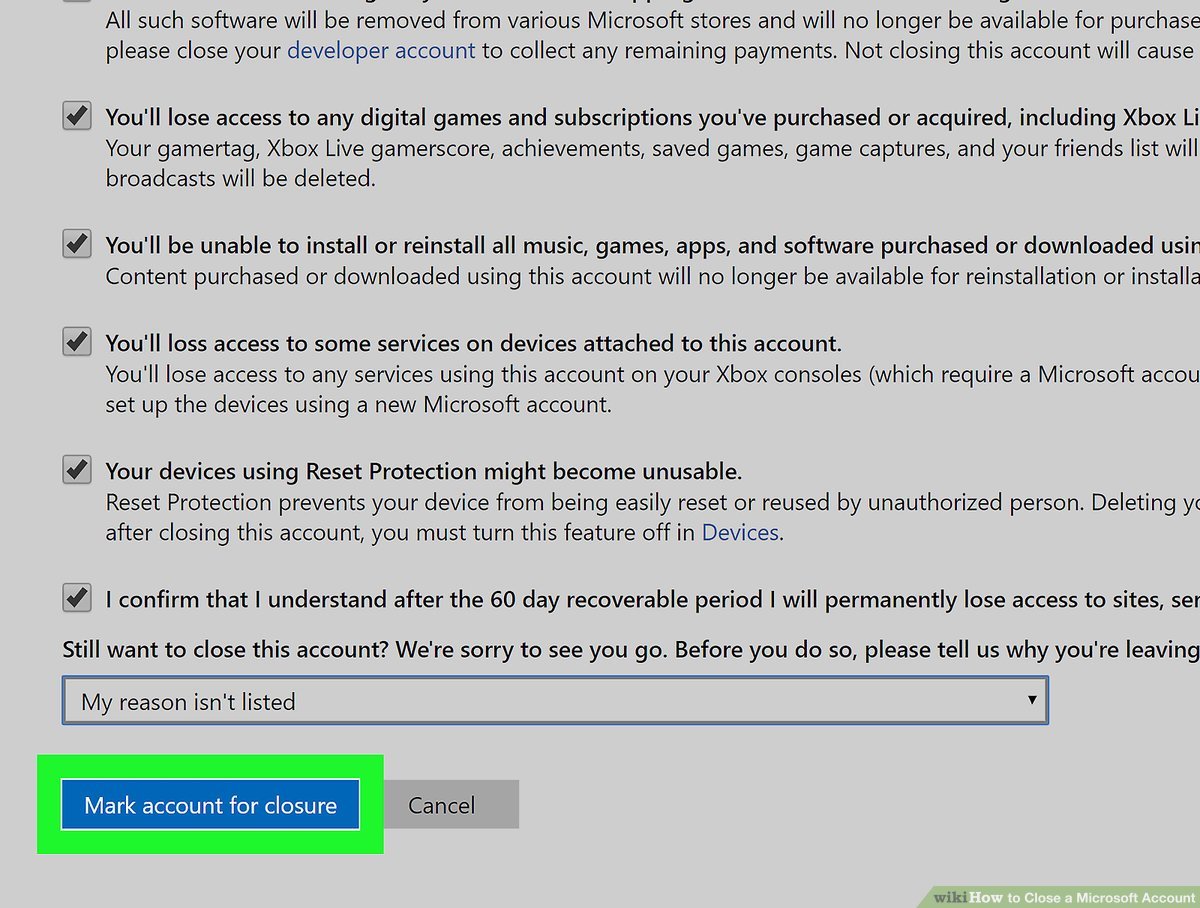
  3. Review the content and check the boxes to demonstrate your comprehension. Then, from the drop-down option, choose a reason for closing your account.
  4. Mark the account for closure by clicking “Mark account for closure.”

    How to Delete Microsoft Account - Step to Step Easy Guide
    Image Source: Wikihow
  5. Your account has been deleted. If you change your mind, you’ll have 30 or 60 days to log back in and prevent your account from being destroyed, depending on the option you selected in step 2.

After that, your account will be permanently deactivated. Check the date listed by Microsoft to find out when your account will be terminated. Hope you liked this guide on How to delete Microsoft Account. 

Also Checkout: A 1-Mile Stretch Of Road Is Being Created In Detroit That Can Charge Electric Cars While Driving If Owners Install A Special Receiver

RelatedPosts

Rows of servers in a data centre

What Is a Large Language Model (LLM)? A Plain-English Guide

Illustration of a phishing email stealing card details

How to Spot a Phishing Message: 9 Red Flags and What to Do

ShareSend
Tweet
Previous Post

9 Movies We Loved Watching At Dharamshala International Film Festival

Next Post

Proactive Measures for Protecting Your Mobile Phone

Related Posts

Rows of servers in a data centre
Technology

What Is a Large Language Model (LLM)? A Plain-English Guide

Large language models power chatbots like ChatGPT, Claude and Gemini. Here is how they work, what they are good at...

Read moreDetails
Illustration of a phishing email stealing card details
Technology

How to Spot a Phishing Message: 9 Red Flags and What to Do

Phishing messages try to trick you into sharing passwords, OTPs or card details. These nine red flags help you catch...

Read moreDetails
A vegetable vendor at a market in Pune, India
Technology

What Is UPI and How Does It Work? A Simple Explanation

UPI moves money between bank accounts in seconds using a phone. Here is how it works, what UPI Lite and...

Read moreDetails
7 Conspiracy Theories That You Would Definitely Want To Believe In
Technology

Can You Download Videos From Facebook?

500 million people view millions of videos on Facebook every day. Some Facebook users wish to save their favorite videos...

Read moreDetails
7 Most Futuristic Concept Cars in the World
Technology

7 Most Futuristic Concept Cars in the World

Concept cars are no longer only a showpiece to draw attention to an automotive company. This is true technological brilliance....

Read moreDetails
What Makes GPT-4 Unique From ChatGPT And How Is It Different?
Technology

What Makes GPT-4 Unique From ChatGPT And How Is It Different?

With inception of new versions and other competitive AI chatbots, there arises a question — What makes GPT-4 Unique From...

Read moreDetails
Load More
Next Post
Proactive Measures for Protecting Your Mobile Phone

Proactive Measures for Protecting Your Mobile Phone

About

The Second Angle

The Second Angle (TSA Mag) is an infotainment and lifestyle magazine covering entertainment, travel, technology, health, education and finance.

Important Links

  • About The Second Angle
  • Write for Us: Guest Post Guidelines
  • Privacy Policy
  • Terms
  • Contact Us
  • Newsletter

Explore

  • Infotainment
  • Entertainment
  • Buzz
  • Education
  • Travel
  • Finance
  • Healthcare
  • Technology
Advertise with us

© 2017-2026. The Second Angle. All Rights Reserved. Developed and Managed by SquareBase.io

Welcome Back!

Login to your account below

Forgotten Password?

Retrieve your password

Please enter your username or email address to reset your password.

Log In
No Result
View All Result
  • Infotainment
    • Sports
    • People
    • Inspiring
  • Entertainment
    • Lifestyle
    • Home & Decoration
  • Buzz
  • Education
  • Travel
  • Finance
  • Healthcare
  • Technology

© 2017-2026. The Second Angle. All Rights Reserved. Developed and Managed by SquareBase.io

This website uses cookies. By continuing to use this website you are giving consent to cookies being used. Visit our Privacy and Cookie Policy.