

• About   |
  • Submit Guest Post |
  • Contact Us
No Result
View All Result
The Second Angle (TSA Magazine)
Advertise
  • Infotainment
    • Sports
    • People
    • Inspiring
  • Entertainment
    • Lifestyle
    • Home & Decoration
  • Buzz
  • Education
  • Travel
  • Finance
  • Healthcare
  • Technology
The Second Angle
No Result
View All Result
  • Infotainment
  • Entertainment
  • Buzz
  • Education
  • Travel
  • Finance
  • Healthcare
  • Technology
Advertisement
ADVERTISEMENT
Home Technology

How To Hide Your Whatsapp Last Seen From Strangers

WhatsApp makes hiding your 'Last Seen' status from friends and profile visitors simple. Here's a quick and easy guide on How to Hide your Whatsapp Last Seen from Strangers.

by TSA Desk
June 10, 2023
in Technology
Reading Time: 2 mins read
How To Hide Your Whatsapp Last Seen From Strangers

Cashify

Share on FacebookShare on WhatsApp
Advertisement Advertisement Advertisement
ADVERTISEMENT

RelatedPosts

7 Conspiracy Theories That You Would Definitely Want To Believe In

Can You Download Videos From Facebook?

7 Most Futuristic Concept Cars in the World

7 Most Futuristic Concept Cars in the World

At this time, WhatsApp is without a doubt the most popular instant messaging app. The instant messaging app is available for Android, iOS, and Windows PC. You can send and receive messages, send files, and make voice and video chats with WhatsApp. In this post, we present you with an easy guide on how to hide your WhatsApp last seen from strangers.

The option to see when someone was last seen on the platform is one of these capabilities. You can check the Last Seen status of anyone in your device’s contacts from WhatsApp, making it very easy to see if the person you want to chat with is active and online.

The default setting for the last seen status on WhatsApp is ‘Everyone,’ making it available to all WhatsApp users. Many people, however, may want to disable this to avoid receiving spam on their accounts. Even if you don’t get spam calls from unknown numbers, it’s wise to set the Last Seen status to My Contact.

Table of Contents
  • How to Hide your Whatsapp Last Seen on Android-
  • How to Hide your Whatsapp Last Seen on iPhone-

How to Hide your Whatsapp Last Seen on Android-

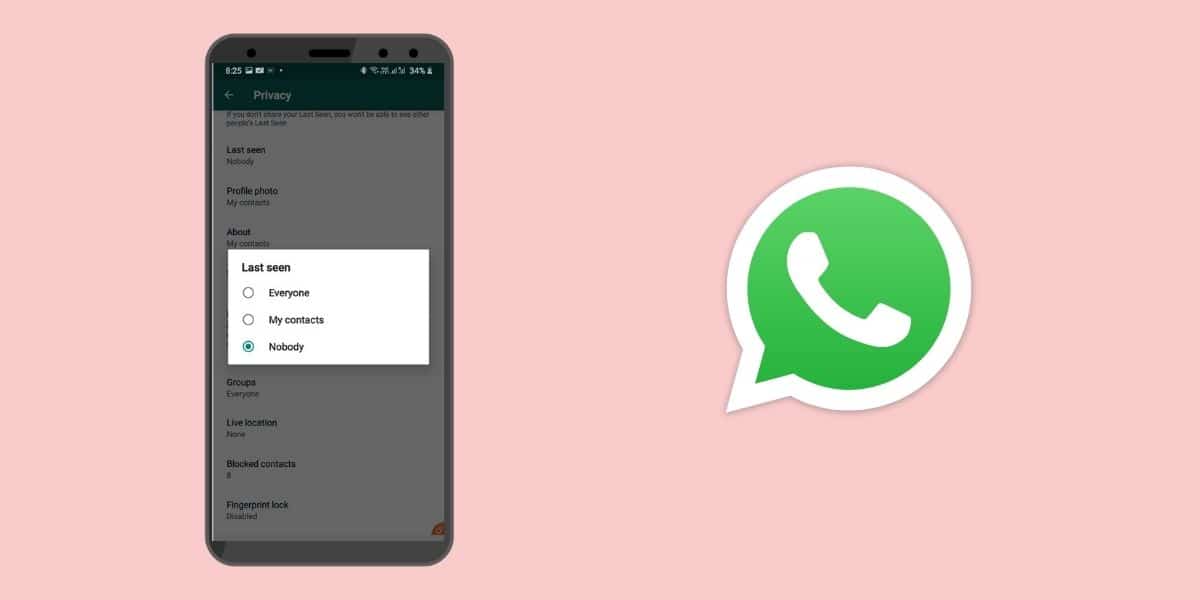
Following these steps, Android users can easily hide their ‘Last Seen’:

  • In the upper right-hand corner of WhatsApp, tap the three vertical dots.
  • Tap the Account option on the Settings page
  • On the following screen, select the Privacy option.
  • Scroll down to the Last Seen option on the Privacy page.
  • Choose an option that best suits your privacy requirements. You have the option of selecting Everyone, My Contacts, or Nobody.

    How to Hide your Whatsapp Last Seen From Strangers
    Image Source: Technical

How to Hide your Whatsapp Last Seen on iPhone-

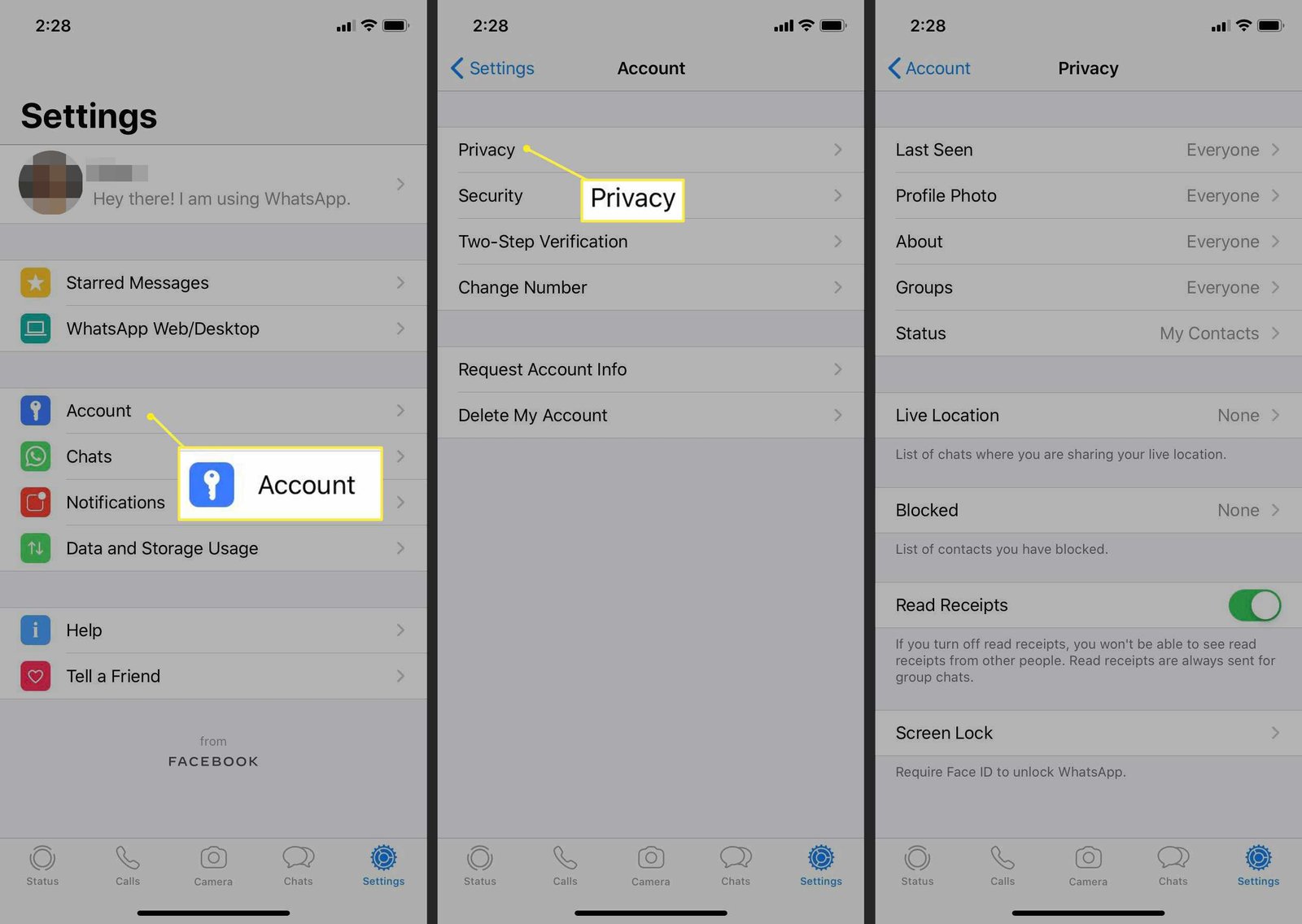
Users of iPhones can also hide their ‘Last Seen’ status from others. Here’s how to do it:

  • Open WhatsApp and go to the bottom left to Settings.
  • Select Account.
  • Select Privacy.
  • Select Last Seen from the drop-down menu.
  • Finally, choose one of the options presented on this page. You have the option of sharing your ‘Last Seen’ status with the entire world, just your contacts, or no one at all.

    How to Hide your Whatsapp Last Seen From Strangers
    Image Source: livewire

It’s crucial to note that your ‘Last Seen’ status indicates when you last used WhatsApp, but your ‘Online’ status indicates when you are currently using the service. Unfortunately, people will be able to see that you are online if you are actively using the app.

Also Checkout: 9 Best Photobucket Alternatives You Must Try

ShareSendTweet
Previous Post

Are You A Game Of Thrones Fan? Here Are 30 Things You Probably Didn’t Know About The Show

Next Post

Indonesia set to deport Australian surfer who apologized for drunken rampage

Related Posts

7 Conspiracy Theories That You Would Definitely Want To Believe In
Technology

Can You Download Videos From Facebook?

500 million people view millions of videos on Facebook every day. Some Facebook users wish to save their favorite videos...

Read moreDetails
7 Most Futuristic Concept Cars in the World
Technology

7 Most Futuristic Concept Cars in the World

Concept cars are no longer only a showpiece to draw attention to an automotive company. This is true technological brilliance....

Read moreDetails
What Makes GPT-4 Unique From ChatGPT And How Is It Different?
Technology

What Makes GPT-4 Unique From ChatGPT And How Is It Different?

With inception of new versions and other competitive AI chatbots, there arises a question — What makes GPT-4 Unique From...

Read moreDetails
20 Most Amazing And Genius Product Packaging Designs Ever Created
Technology

20 Most Amazing And Genius Product Packaging Designs Ever Created

The majority of our items are packaged in some style. Certain products don't require as much packing because customers will...

Read moreDetails
7 Most Expensive Cars In The World
Listicles

7 Most Expensive Cars In The World

Cars have been defined as a symbol of both luxury and status. While most of us are using our cars...

Read moreDetails
Top Examples Of Interactive Marketing & How Brands Can Make The Most Of It
Business

Top Examples Of Interactive Marketing & How Brands Can Make The Most Of It

In today's fast-paced digital age, companies must continually find new ways to engage with consumers. One increasingly popular approach is...

Read moreDetails
Load More
Next Post
Indonesia set to deport Australian surfer who apologized for drunken rampage

Indonesia set to deport Australian surfer who apologized for drunken rampage

Important Links

  • About
  • Guest Post
  • Privacy Policy
  • Terms
  • Contact Us
  • Newsletter

© 2017-23. The Second Angle. All Rights Reserved. Developed and Managed by SquareBase.io

Welcome Back!

Login to your account below

Forgotten Password?

Retrieve your password

Please enter your username or email address to reset your password.

Log In
No Result
View All Result
  • Infotainment
    • Sports
    • People
    • Inspiring
  • Entertainment
    • Lifestyle
    • Home & Decoration
  • Buzz
  • Education
  • Travel
  • Finance
  • Healthcare
  • Technology

© 2017-23. The Second Angle. All Rights Reserved. Developed and Managed by SquareBase.io

This website uses cookies. By continuing to use this website you are giving consent to cookies being used. Visit our Privacy and Cookie Policy.