


• About   |
  • Advertise |
  • Contact Us
No Result
View All Result
The Second Angle (TSA Magazine)
Advertise
  • Infotainment
    • Sports
    • People
    • Inspiring
  • Entertainment
    • Lifestyle
    • Home & Decoration
  • Buzz
  • Education
  • Travel
  • Finance
  • Healthcare
  • Technology
The Second Angle
No Result
View All Result
  • Infotainment
  • Entertainment
  • Buzz
  • Education
  • Travel
  • Finance
  • Healthcare
  • Technology
Advertisement Advertisement Advertisement
ADVERTISEMENT
Home Technology

Facebook Messenger Now Supports Screenshot Notifications Like Snapchat

Meta's Facebook Messenger now has a number of new features, the majority of which are centered on the messaging app's end-to-end encryption security capabilities.

by TSA Desk
March 18, 2023
in Technology
Reading Time: 2 mins read
Facebook Messenger Now Supports Screenshot Notifications Like Snapchat

PCMag

Share on FacebookShare on WhatsApp
Advertisement Advertisement Advertisement
ADVERTISEMENT
2 min readGAdd The Second Angle as a preferred source on Google
Key takeaways
End-to-end encryption is now available in Facebook Messenger, including features such as screenshot detection, message reactions, and typing indicators.The Screenshot Detection tool is an intriguing addition to Messenger.Timothy Buck, the Product Manager, stated in a blog post, “Today, we’re announcing updates for Messenger’s opt-in end-to-end encrypted chats that will help improve your messaging experience.

End-to-end encryption is now available in Facebook Messenger, including features such as screenshot detection, message reactions, and typing indicators. Messenger’s opt-in end-to-end encrypted chats are getting these features.

Facebook Messenger now Supports Screenshot notifications Like Snapchat
Image Source: BBC

The Screenshot Detection tool is an intriguing addition to Messenger. It’s comparable to Snapchat, which alerts you when someone screenshots your conversation. If a screenshot of a disappearing message is taken, all Messenger users will be notified. The vanish mode in Messenger has a similar capability.

Table of Contents
  • New End-to-end encryption available on Facebook Messenger

New End-to-end encryption available on Facebook Messenger

Timothy Buck, the Product Manager, stated in a blog post, “Today, we’re announcing updates for Messenger’s opt-in end-to-end encrypted chats that will help improve your messaging experience. Building secure and fun interactive features take time and require our engineers to innovate and solve technical challenges, so this is part of a series of product updates as we keep improving our services. With cybercrime and hacking on the rise, it’s more important than ever to find great ways to connect with friends and family through private and secure communications.”

7 Best Virtual Reality Apps For Android – VR AppsAlso read7 Best Virtual Reality Apps For Android – VR Apps

The new “Screenshot Notification” feature in Facebook Messenger will alert you if someone snaps a screenshot of vanishing messages in end-to-end encryption discussions. This feature was already accessible in Messenger’s Vanish mode if you recall.
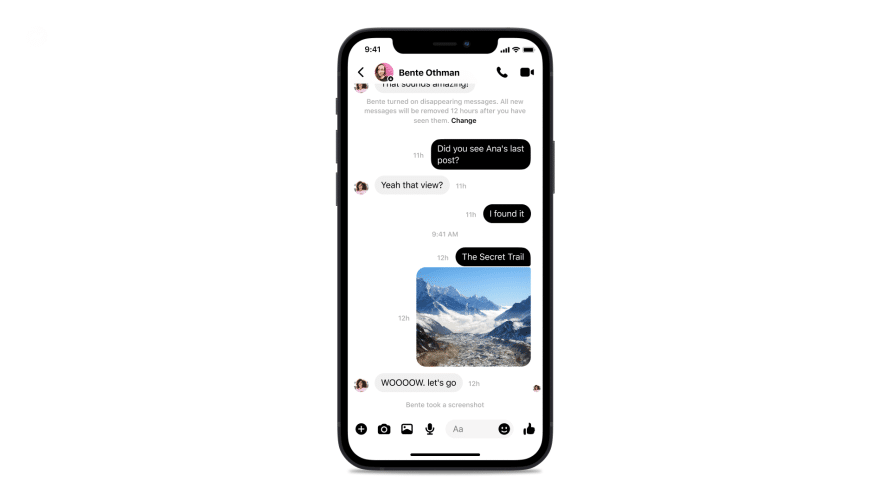
Facebook Messenger now Supports Screenshot notifications Like Snapchat
Image Source: beebalm

This is comparable to Snapchat’s exclusive function. Because Facebook has imitated Snapchat yet again, it’s likely that this will be used for WhatsApp and even Instagram. It will be available to users in the following weeks.

GIFs and Stickers will now be available in Facebook Messenger’s end-to-end encrypted chats, which are an opt-in feature by default. This allows users to have fun while maintaining security and privacy. It also contains message reactions, which can be used on both Facebook and Instagram messages.

Another new feature is the ability to reply to a specific message in end-to-end encryption chats by either long-pressing it or swiping to reply. This is a function that is also available on WhatsApp and Instagram DMs. You’ll also be able to forward messages to group or personal Facebook Messenger chats by long-pressing them. In E2EE talks, typing indicators will be accessible to see if the other person is typing.

Also Checkout: 7 Best Virtual Reality Apps For Android – VR Apps

Enjoyed this story?Share it with your friends
WhatsAppLinkedInXFacebookEmail
See more TSA Mag stories on GoogleAdd us as a preferred source and our stories will show up more often in your Top Stories.
GAdd The Second Angle as a preferred source on Google
ShareSend
Tweet
Previous Post

Hawkeye Actor Vincent D’Onofrio Reveals When He Was Approached To Return As Kingpin

Next Post

5 Best International Trips Under 50,000 Rupees (600 USD)

Related Posts

LinkedIn logo sculpture at the LinkedIn office in Mountain View
Technology

How to Remove a Job Post on LinkedIn: Close It on Desktop or App

LinkedIn job posts cannot be deleted, only closed. Step-by-step instructions to close a job post on desktop and the LinkedIn...

Read moreDetails
10 Useful Gadgets for Everyday Life in India (2026 Picks)
Technology

10 Useful Gadgets for Everyday Life in India (2026 Picks)

Useful gadgets for everyday life in India: 65W GaN charger, power bank, smart plug, JioTag, Kindle and more, with prices...

Read moreDetails
Person checking a laptop screen for signs that their email address was exposed in a data breach
Technology

How to Check If Your Email Was in a Data Breach (2026 Guide)

How to check if your email was in a data breach using Have I Been Pwned, Google, Apple and Mozilla...

Read moreDetails
Customer scanning a UPI QR code with a smartphone to make a small payment
Technology

What Is UPI Lite Limit in 2026? Wallet, Payment Caps and Setup

What is UPI Lite limit in 2026: Rs 1,000 per payment and Rs 5,000 balance. How to enable it, auto...

Read moreDetails
Smartphone showing mobile network settings used to add an eSIM in India
Technology

How to Activate eSIM in Jio, Airtel and Vi: Step-by-Step Guide

How to activate eSIM in Jio, Airtel and Vi: check phone support, follow official app steps, know the charges, switch...

Read moreDetails
10 Best Free Productivity Apps in 2026 and What Each Plan Offers
Technology

10 Best Free Productivity Apps in 2026 and What Each Plan Offers

The best free productivity apps in 2026, including Notion, Todoist, Trello and Obsidian, with free plan limits checked on each...

Read moreDetails
Load More
Next Post
5 Best International Trips Under 50,000 Rupees (600 USD)

5 Best International Trips Under 50,000 Rupees (600 USD)

About

The Second Angle

The Second Angle (TSA Mag) is an infotainment and lifestyle magazine covering entertainment, travel, technology, health, education and finance.

Important Links

  • About The Second Angle
  • Advertise With Us
  • Editorial Policy
  • Privacy Policy
  • Terms and Conditions
  • Contact Us
  • Careers
  • Newsletter

Explore

  • Infotainment
  • Entertainment
  • Buzz
  • Education
  • Travel
  • Finance
  • Healthcare
  • Technology
Advertise with us

© 2017-2026. The Second Angle. All Rights Reserved. Developed and Managed by Squarebase.io

Welcome Back!

Login to your account below

Forgotten Password?

Retrieve your password

Please enter your username or email address to reset your password.

Log In
No Result
View All Result
  • Infotainment
    • Sports
    • People
    • Inspiring
  • Entertainment
    • Lifestyle
    • Home & Decoration
  • Buzz
  • Education
  • Travel
  • Finance
  • Healthcare
  • Technology

© 2017-2026. The Second Angle. All Rights Reserved. Developed and Managed by Squarebase.io

We use cookies to keep TSA fast and relevant. Read our Privacy Policy.





