
• About   |
  • Advertise |
  • Contact Us
No Result
View All Result
The Second Angle (TSA Magazine)
Advertise
  • Infotainment
    • Sports
    • People
    • Inspiring
  • Entertainment
    • Lifestyle
    • Home & Decoration
  • Buzz
  • Education
  • Travel
  • Finance
  • Healthcare
  • Technology
The Second Angle
No Result
View All Result
  • Infotainment
  • Entertainment
  • Buzz
  • Education
  • Travel
  • Finance
  • Healthcare
  • Technology
Advertisement Advertisement Advertisement
ADVERTISEMENT
Home Technology

Fitness Buddy App Review 2022 | Workouts And Exercises

Use Fitness Buddy app for workout goals like body building, beachbody, summer body, six pack, belly fat, abs, stronglifts, pft, army, powerlifting, etc.

by TSA Desk
November 3, 2022
in Technology
Reading Time: 4 mins read
Fitness Buddy App Review 2022 | Workouts And Exercises

Tom's Guide

Share on FacebookShare on WhatsApp
Advertisement Advertisement Advertisement
ADVERTISEMENT
4 min readGAdd The Second Angle as a preferred source on Google
Key takeaways
Workout objectives such as bodybuilding, beach body, six-pack, belly fat, abs, stronglifts, pft, and army powerlifting may be achieved with the help of Fitness Buddy.Once logged in, the primary menu option “Browse Workouts” allows you to rapidly select and browse workouts.You may watch Total Gym TV online or on your mobile device.
Table of Contents
  • What is the Fitness Buddy app?
  • Main Highlights
  • Features of the Fitness Buddy App 
  • Fitness Buddy App Review
  • Frequently Asked Questions

What is the Fitness Buddy app?

Workout objectives such as bodybuilding, beach body, six-pack, belly fat, abs, stronglifts, pft, and army powerlifting may be achieved with the help of Fitness Buddy. In clubs like 24 Hour Fitness, LA Fitness, Crunch, Lifetime Fitness, Anytime Fitness, and others, Fitness Buddy demonstrates perfect techniques for exercises like the bench press and squat.

Main Highlights

  • One hundred and twenty-six workout descriptions and instructional videos for the gym are included in this comprehensive guide.
  • There are a variety of workouts to help you plan your week, which can be severe or easy.
  • Using this software, you may work out at home with a variety of pre-programmed workouts.
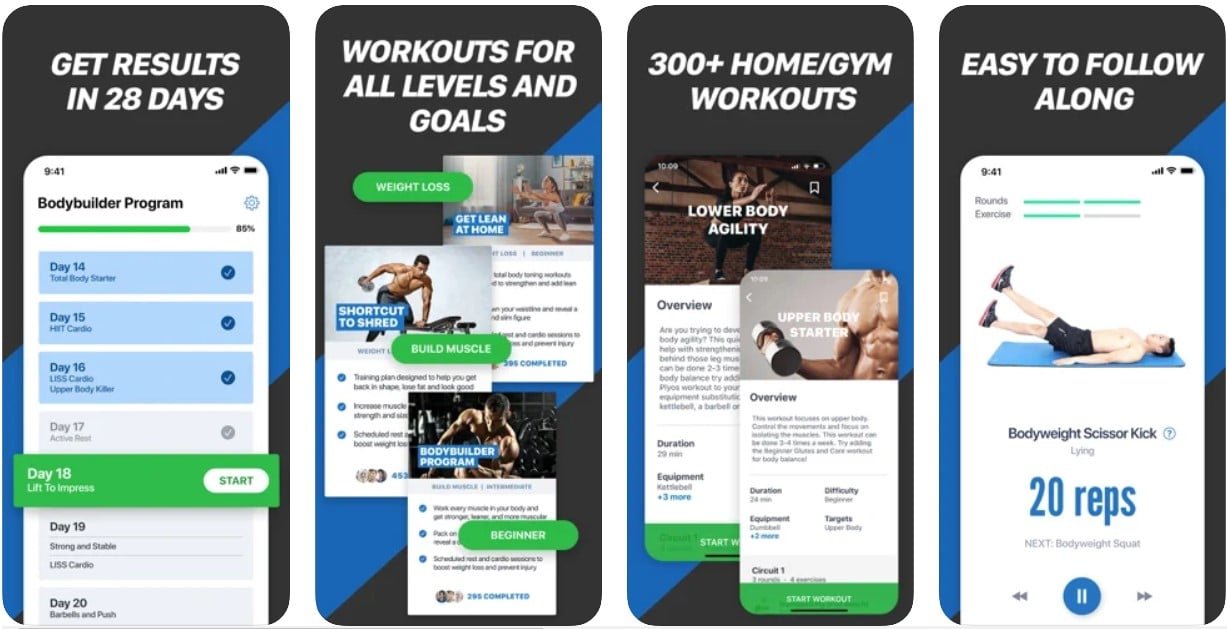
 

Fitness Buddy App Review 2022 | Workouts and Exercises

How To Easily Add Friends On SteamAlso readHow To Easily Add Friends On Steam

Features of the Fitness Buddy App 

  • It’s important to exercise in the right manner (bench press, squat, deadlift).
  • High-definition workout videos for good technique and fitness/six-pack abs are available.
  • a wide range of gear (barbell, dumbbell, machine, etc)
  • Classification of exercises (core / abs; leg; chest; deltoid; back; biceps; cardio);
  • Muscle group and exercise instructions.
  • A wide range of exercise programs to suit a variety of objectives (weight loss, muscle gain).
  • Specific Workout (chest, butt, weight loss, six-pack, bodybuilding, beach body, summer body, belly fat, abs, stronglifts, pft, army, powerlifting).
  • Exercises tailored to the gym’s equipment (core/abdominals, lower body/leg; chest; deltoid; back; arm; bicep/triceps; cardio)
  • Programs for education (strong lift, 5×5, starting strength, bodybuilding, 531, weightlifting, powerlifting).
  • It is important to keep an eye on your overall health and fitness level by keeping track of things like your weight and other body measurements.
  • Weight reduction and muscle building may both be tracked with a weighing scale.
  • Today is the day to get in some exercise with your Fitness Buddy. You may take it to clubs like 24 Hour Fitness, LA Fitness, Crunch, Lifetime Fitness, and others to work out at any time of day.

Fitness Buddy App Review


Fitness Buddy App Review 2022 | Workouts and Exercises

Frequently Asked Questions

  • Which Program Should I Pick?

Once logged in, the primary menu option “Browse Workouts” allows you to rapidly select and browse workouts. You may browse and sort through all of the Total Gym TV workouts on this page to get exactly what you’re looking for. Each month, new workouts are automatically added to your library if you have a Premium subscription to Total Gym TV.

You may watch Total Gym TV online or on your mobile device. The Total Gym TV app is now available on iOS, Android, Roku, tvOS (Apple TV), and FireTV as well as the other aforementioned mobile platforms and streaming devices. Using one of the logos below, you may access the Total Gym TV app for a certain platform.

  • I don’t know how to log in.

Right-click the “Sign In” button on your computer’s screen and select “Sign In”.

When you’re on your mobile device, go to the menu and select “Sign In.”

Sign in using your email address and password that you used to register.

Have trouble signing in? Click the “Forgot Password” link underneath the “Sign In” form and follow the on-screen instructions to get your password back. It’s that simple!

  • To sign up, the app asks for the following information:

To get a network-based position that is approximate, the app has access to the user’s current location. Aside from that, it makes sure you’re connected to a network with enough bandwidth. It has to be authorized to connect to Bluetooth devices. The Bluetooth settings may be accessed using this. Access to the network is unrestricted for the app. As soon as the phone is turned on, vibration control is activated to keep it from going to sleep.

  • In-app purchases are available for this software.

The iOS software may be downloaded for free from the App Store. Then then, there are some features that need an in-app payment.

FITNESS FOR THE WHOLE BODY.

The Spartan’s Workout.

Every Single Exercise.

  • How many devices can the app run on?

As of right now, the app is only compatible with iPhones running iOS 11.1 or newer. For the iPod touch, iOS 11.1 or above is necessary. Macs can run the software, however, they must have macOS 11.0 or later and an Apple M1 chip.

  • Does the app have a global audience?

The software supports a wide range of languages, including English, Dutch, French, German, and Spanish.

Also, Checkout: How To Easily Add Friends On Steam

Enjoyed this story?Share it with your friends
WhatsAppLinkedInXFacebookEmail
See more TSA Mag stories on GoogleAdd us as a preferred source and our stories will show up more often in your Top Stories.
GAdd The Second Angle as a preferred source on Google
ShareSend
Tweet
Previous Post

Irshad Kamil’s Appreciation Post

Next Post

One child among four family members killed in car crash

Related Posts

Person checking a laptop screen for signs that their email address was exposed in a data breach
Technology

How to Check If Your Email Was in a Data Breach (2026 Guide)

How to check if your email was in a data breach using Have I Been Pwned, Google, Apple and Mozilla...

Read moreDetails
Customer scanning a UPI QR code with a smartphone to make a small payment
Technology

What Is UPI Lite Limit in 2026? Wallet, Payment Caps and Setup

What is UPI Lite limit in 2026: Rs 1,000 per payment and Rs 5,000 balance. How to enable it, auto...

Read moreDetails
Smartphone showing mobile network settings used to add an eSIM in India
Technology

How to Activate eSIM in Jio, Airtel and Vi: Step-by-Step Guide

How to activate eSIM in Jio, Airtel and Vi: check phone support, follow official app steps, know the charges, switch...

Read moreDetails
10 Best Free Productivity Apps in 2026 and What Each Plan Offers
Technology

10 Best Free Productivity Apps in 2026 and What Each Plan Offers

The best free productivity apps in 2026, including Notion, Todoist, Trello and Obsidian, with free plan limits checked on each...

Read moreDetails
A man in Bengaluru looking at his smartphone
Technology

DigiLocker Guide: How to Use It and Which Documents Are Valid

A simple DigiLocker guide for India: how to sign up, fetch your PAN, driving licence and marksheets, share them safely,...

Read moreDetails
A young person using a mobile phone
Technology

How to Block a Lost or Stolen Phone on Sanchar Saathi (CEIR)

Lost your mobile? Here is how to block a lost phone on Sanchar Saathi using CEIR, the documents you need,...

Read moreDetails
Load More
Next Post
Demand to introduce store-value cards, tokens for Kochi metro commuters

One child among four family members killed in car crash

About

The Second Angle

The Second Angle (TSA Mag) is an infotainment and lifestyle magazine covering entertainment, travel, technology, health, education and finance.

Important Links

  • About The Second Angle
  • Advertise With Us
  • Editorial Policy
  • Privacy Policy
  • Terms and Conditions
  • Contact Us
  • Careers
  • Newsletter

Explore

  • Infotainment
  • Entertainment
  • Buzz
  • Education
  • Travel
  • Finance
  • Healthcare
  • Technology
Advertise with us

© 2017-2026. The Second Angle. All Rights Reserved. Developed and Managed by Squarebase.io

Welcome Back!

Login to your account below

Forgotten Password?

Retrieve your password

Please enter your username or email address to reset your password.

Log In
No Result
View All Result
  • Infotainment
    • Sports
    • People
    • Inspiring
  • Entertainment
    • Lifestyle
    • Home & Decoration
  • Buzz
  • Education
  • Travel
  • Finance
  • Healthcare
  • Technology

© 2017-2026. The Second Angle. All Rights Reserved. Developed and Managed by Squarebase.io

We use cookies to keep TSA fast and relevant. Read our Privacy Policy.