

• About   |
  • Submit Guest Post |
  • Contact Us
No Result
View All Result
The Second Angle (TSA Magazine)
Advertise
  • Infotainment
    • Sports
    • People
    • Inspiring
  • Entertainment
    • Lifestyle
    • Home & Decoration
  • Buzz
  • Education
  • Travel
  • Finance
  • Healthcare
  • Technology
The Second Angle
No Result
View All Result
  • Infotainment
  • Entertainment
  • Buzz
  • Education
  • Travel
  • Finance
  • Healthcare
  • Technology
Advertisement
ADVERTISEMENT
Home Technology

How to Boot Android 12L on your x86 PC

The community of custom ROM developers has been thriving for years because of Android's Linux open-source-based foundation. Here’s how to Boot Android 12L on your x86 PC.

by TSA Desk
March 30, 2022
in Technology
Reading Time: 3 mins read
How to Boot Android 12L on your x86 PC
Share on FacebookShare on WhatsApp
Advertisement Advertisement Advertisement
ADVERTISEMENT

Android’s open-source nature allows users to customize the operating system to their specific requirements. Bliss ROMs, for example, maintain a version of Android for the ancient x86 platform called Bliss OS. The project has now reached its next milestone, with the first Android 12L beta release being available for download on virtual machines and PCs.

Table of Contents
  • How to Boot Android 12L on your x86 PC
  • Bliss OS team brings Android 12L for x86 PCs
  • The following is the complete changelog for the initial beta release:

How to Boot Android 12L on your x86 PC

Notably, there were two Bliss OS 15 alpha releases based on Android 12 released in December of last year. While the Bliss OS codebase is being rebased on Android 12L, Jon West, aka XDA Recognized Contributor electrikjesus, has posted a work-in-progress vanilla Android-x86 version that shows the first peek of vanilla Android 12L operating on a PC. The maintainers now believe the Android-x86 release is ready for popular PC settings, therefore the first beta build is available.

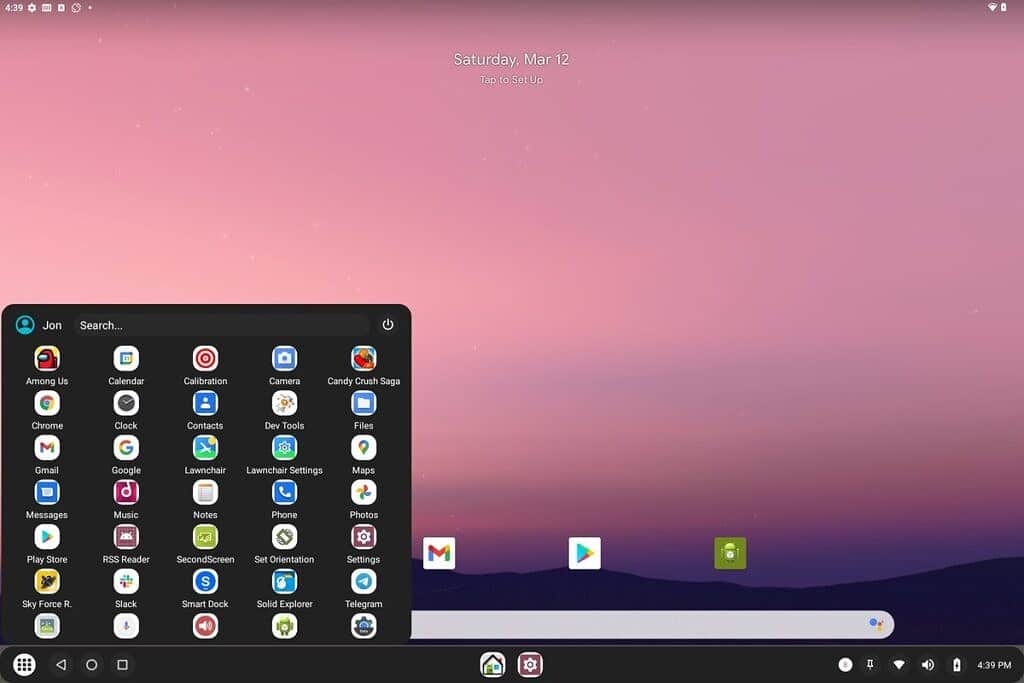
Apart from the usual new features, Android 12L has also improved compatibility with desktop hardware by incorporating extra drivers and UI improvements. Although the Android-x86 project has always maintained a similar resemblance to stock Android, this custom release offers a desktop mode launcher as an alternate launcher that should be more suited for use with a keyboard and mouse.

Recents pic.twitter.com/sgBI5WbWIU

— Jon West (@electrikjesus) March 12, 2022

RelatedPosts

7 Conspiracy Theories That You Would Definitely Want To Believe In

Can You Download Videos From Facebook?

7 Most Futuristic Concept Cars in the World

7 Most Futuristic Concept Cars in the World

Bliss OS team brings Android 12L for x86 PCs

The installation process is optimized for a UEFI-based environment with a GUID partition table (GPT) file system, although advanced users can tweak the GRUB options to let it boot on legacy platforms. The Play Store and other Google services are preinstalled in the build, so there’s no need to flash a separate GApps package.

The following is the complete changelog for the initial beta release:

  • Added Smart Dock (Desktop Mode Launcher)
  • Updated to Linux Kernel 5.10.70 (with kernel-SU)
  • Updated to Mesa 22.0.0 (meson build)
  • Added new grub entries for graphics options
  • Added Google Play Store (GMS/Gapps)
  • Fixes for libndk-translation for arm & arm64
  • Updates to media packages for wider support through libva and omx

Visit Bliss OS’s official website to try out Android 12L on your PC and read more about the project. Because installing Android on a PC is more difficult than flashing a ROM on a phone, the creators insist that you pass a short test before downloading the ISO package. Regardless, the exact download link is provided below; however, before getting your hands dirty, do your research and thoroughly read the installation instructions.

Also Checkout: 11 Necessary Things to Consider When Buying a Gaming PC – Gaming PC Buying Guide

Source: TechiDroid

Continue Reading
ShareSendTweet
Previous Post

Hip Hop tracks that need to be on your playlist

Next Post

Seeding A Data Revolution In Indian Agriculture

Related Posts

7 Conspiracy Theories That You Would Definitely Want To Believe In
Technology

Can You Download Videos From Facebook?

500 million people view millions of videos on Facebook every day. Some Facebook users wish to save their favorite videos...

Read moreDetails
7 Most Futuristic Concept Cars in the World
Technology

7 Most Futuristic Concept Cars in the World

Concept cars are no longer only a showpiece to draw attention to an automotive company. This is true technological brilliance....

Read moreDetails
What Makes GPT-4 Unique From ChatGPT And How Is It Different?
Technology

What Makes GPT-4 Unique From ChatGPT And How Is It Different?

With inception of new versions and other competitive AI chatbots, there arises a question — What makes GPT-4 Unique From...

Read moreDetails
20 Most Amazing And Genius Product Packaging Designs Ever Created
Technology

20 Most Amazing And Genius Product Packaging Designs Ever Created

The majority of our items are packaged in some style. Certain products don't require as much packing because customers will...

Read moreDetails
7 Most Expensive Cars In The World
Listicles

7 Most Expensive Cars In The World

Cars have been defined as a symbol of both luxury and status. While most of us are using our cars...

Read moreDetails
Top Examples Of Interactive Marketing & How Brands Can Make The Most Of It
Business

Top Examples Of Interactive Marketing & How Brands Can Make The Most Of It

In today's fast-paced digital age, companies must continually find new ways to engage with consumers. One increasingly popular approach is...

Read moreDetails
Load More
Next Post
Seeding A Data Revolution In Indian Agriculture

Seeding A Data Revolution In Indian Agriculture

Important Links

  • About
  • Guest Post
  • Privacy Policy
  • Terms
  • Contact Us
  • Newsletter

© 2017-23. The Second Angle. All Rights Reserved. Developed and Managed by SquareBase.io

Welcome Back!

Login to your account below

Forgotten Password?

Retrieve your password

Please enter your username or email address to reset your password.

Log In
No Result
View All Result
  • Infotainment
    • Sports
    • People
    • Inspiring
  • Entertainment
    • Lifestyle
    • Home & Decoration
  • Buzz
  • Education
  • Travel
  • Finance
  • Healthcare
  • Technology

© 2017-23. The Second Angle. All Rights Reserved. Developed and Managed by SquareBase.io

This website uses cookies. By continuing to use this website you are giving consent to cookies being used. Visit our Privacy and Cookie Policy.