


• About   |
  • Advertise |
  • Contact Us
No Result
View All Result
The Second Angle (TSA Magazine)
Advertise
  • Infotainment
    • Sports
    • People
    • Inspiring
  • Entertainment
    • Lifestyle
    • Home & Decoration
  • Buzz
  • Education
  • Travel
  • Finance
  • Healthcare
  • Technology
The Second Angle
No Result
View All Result
  • Infotainment
  • Entertainment
  • Buzz
  • Education
  • Travel
  • Finance
  • Healthcare
  • Technology
Advertisement Advertisement Advertisement
ADVERTISEMENT
Home Technology

How To Turn On Dark Mode In Snapchat

Adoption of dark mode for applications peaked in 2019. Almost every other software developer was concentrating on implementing dark mode in their products. Here is an easy guide on How to Turn on Dark Mode in Snapchat.

by TSA Desk
April 7, 2023
in Technology
Reading Time: 3 mins read
How To Turn On Dark Mode In Snapchat

IT Geared

Share on FacebookShare on WhatsApp
Advertisement Advertisement Advertisement
ADVERTISEMENT
3 min readGAdd The Second Angle as a preferred source on Google
Key takeaways
Snapchat Dark Mode is now available on iOS and Android (2022): While the iPhone app has a native option to enable or disable the dark theme, the Android version...How to Turn on Dark Mode on Snapchat?: Let’s start the guide on How to turn on Dark Mode on Snapchat.On your iPhone, enable Dark Mode on SnapchatInstall Snapchat Dark Mode on Your Android Device: On Android, Snapchat does not currently have an official dark mode setting.

With the advent of system-wide dark themes for Android and iOS, navigating the dark side became much easier. However, if there is one app that defied industry expectations, it has to be Snapchat. In this post, we present you with an easy guide on how to turn on dark mode on Snapchat.

The photo-centric messaging app finally added dark mode to iOS earlier this year, with Android compatibility expected soon. Today, we’ll walk you through the steps to enable Snapchat’s dark mode.

How to Turn on Dark Mode in Snapchat
image source: toms guide
Table of Contents
  • Snapchat Dark Mode is now available on iOS and Android (2022)
  • How to Turn on Dark Mode on Snapchat?
  • On your iPhone, enable Dark Mode on Snapchat
  • Install Snapchat Dark Mode on Your Android Device

Snapchat Dark Mode is now available on iOS and Android (2022)

While the iPhone app has a native option to enable or disable the dark theme, the Android version lacks this feature. Many Android users have long been curious about how to enable dark mode in Snapchat on their smartphones. And you’ve arrived at the correct location. We’ve provided a handy workaround for enabling Snapchat’s dark look on your Android phone. So, without further ado, let’s get started.
How To Change Snapchat Username – Easiest GuideAlso readHow To Change Snapchat Username – Easiest Guide

How to Turn on Dark Mode on Snapchat?

Let’s start the guide on How to turn on Dark Mode on Snapchat.

On your iPhone, enable Dark Mode on Snapchat

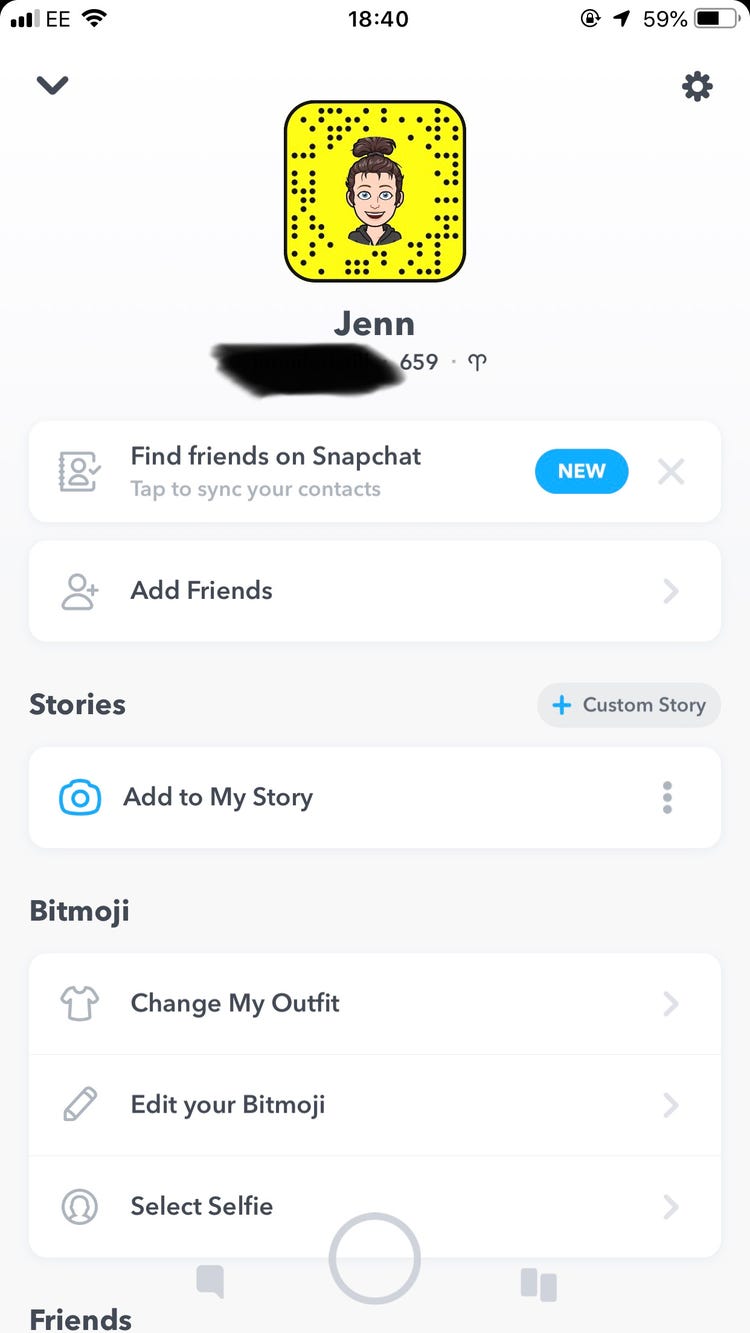
  • Open your Snapchat profile by tapping the Bitmoji symbol in the top-left corner.
  • On the profile page, click the Settings gear icon in the upper-right corner of the screen.
How to Turn on Dark Mode in Snapchat
image source: business insider
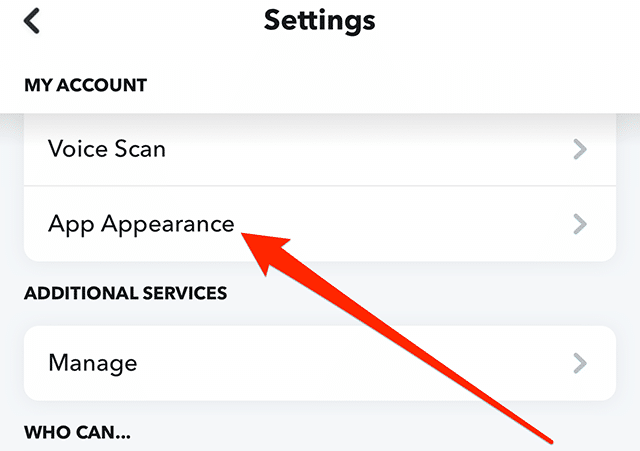
  • In the “My Account” settings, tap “App Appearance” to see the ability to modify the Snapchat theme.
How to Turn on Dark Mode in Snapchat
image source: Adweek
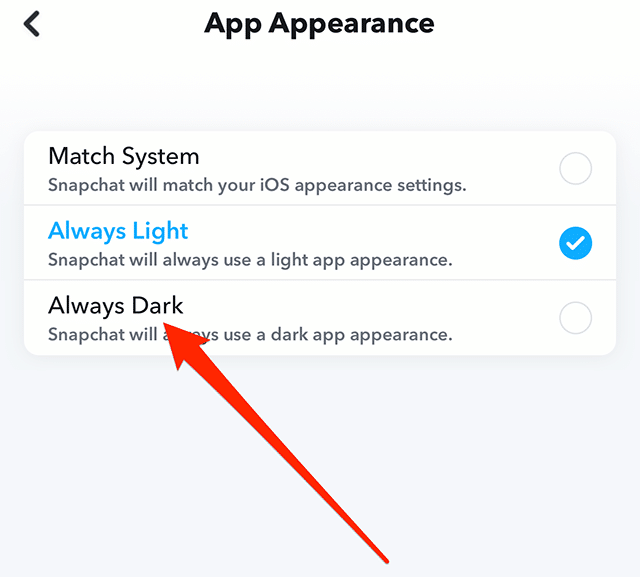
  • From the “App Appearance” options, choose “Always dark” to enable Snapchat’s dark mode on your iPhone.
How to Turn on Dark Mode in Snapchat
image source: Adweek

Install Snapchat Dark Mode on Your Android Device

On Android, Snapchat does not currently have an official dark mode setting. This section will be updated as soon as Snapchat releases the dark theme for its Android app. The closest you can come right now is to enable the “forced system-wide dark mode” option in the developer settings.

While it isn’t ideal, it is preferable to gaze at Android’s present retina-blinding light option. So, if you want to force-enable dark mode on Snapchat for Android, follow these steps.

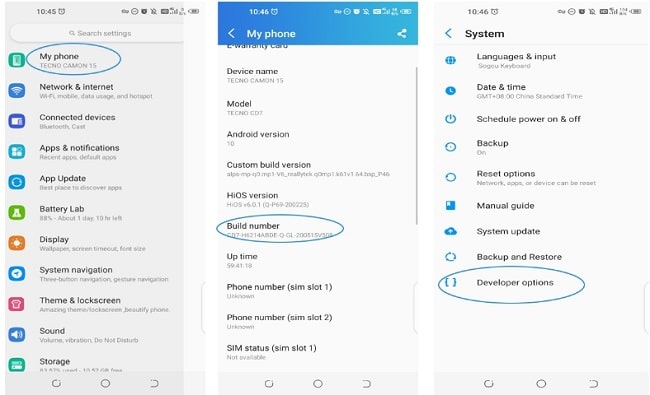
  • Launch the Settings app and select “About phone.” Scroll down until you reach the “Build number,” then press it seven times. On your Android smartphone, you have now activated developer mode.
How to Turn on Dark Mode in Snapchat
image source: android.gadget hacks
  • Return to the Settings home page and select “System -> Developer options” to access developer options.
How to Turn on Dark Mode in Snapchat
image source: car care
  • Enabling the “Override force-dark” setting here will enable forced dark mode on your phone. In the future, Android will invert colors on applications that don’t have native dark mode support.
How To Turn On Dark Mode In Snapchat
image source: jwtalk.net
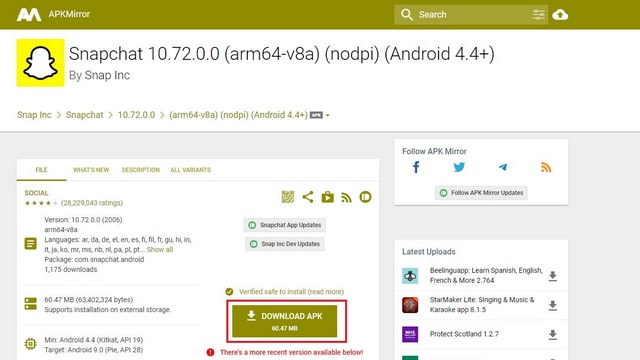
  • Navigate to the APKMirror link and press the “Download APK” button to install Snapchat version 10.72.0.0 on your device. You run the risk of missing out on upcoming features.
How to Turn on Dark Mode in Snapchat
image source: beebalm
  • The forced dark mode setting allows you to enable the dark theme in Snapchat for Android manually. The content is intelligible and has no reading difficulties.

Also check out: How To Change Snapchat Username – Easiest Guide

Enjoyed this story?Share it with your friends
WhatsAppLinkedInXFacebookEmail
See more TSA Mag stories on GoogleAdd us as a preferred source and our stories will show up more often in your Top Stories.
GAdd The Second Angle as a preferred source on Google
ShareSend
Tweet
Previous Post

Bollywood Moodboard Ft. Kishore Kumar

Next Post

2 killed in West Bank after Israel strikes Lebanon, Gaza

Related Posts

Person checking a laptop screen for signs that their email address was exposed in a data breach
Technology

How to Check If Your Email Was in a Data Breach (2026 Guide)

How to check if your email was in a data breach using Have I Been Pwned, Google, Apple and Mozilla...

Read moreDetails
Customer scanning a UPI QR code with a smartphone to make a small payment
Technology

What Is UPI Lite Limit in 2026? Wallet, Payment Caps and Setup

What is UPI Lite limit in 2026: Rs 1,000 per payment and Rs 5,000 balance. How to enable it, auto...

Read moreDetails
Smartphone showing mobile network settings used to add an eSIM in India
Technology

How to Activate eSIM in Jio, Airtel and Vi: Step-by-Step Guide

How to activate eSIM in Jio, Airtel and Vi: check phone support, follow official app steps, know the charges, switch...

Read moreDetails
10 Best Free Productivity Apps in 2026 and What Each Plan Offers
Technology

10 Best Free Productivity Apps in 2026 and What Each Plan Offers

The best free productivity apps in 2026, including Notion, Todoist, Trello and Obsidian, with free plan limits checked on each...

Read moreDetails
A man in Bengaluru looking at his smartphone
Technology

DigiLocker Guide: How to Use It and Which Documents Are Valid

A simple DigiLocker guide for India: how to sign up, fetch your PAN, driving licence and marksheets, share them safely,...

Read moreDetails
A young person using a mobile phone
Technology

How to Block a Lost or Stolen Phone on Sanchar Saathi (CEIR)

Lost your mobile? Here is how to block a lost phone on Sanchar Saathi using CEIR, the documents you need,...

Read moreDetails
Load More
Next Post
2 killed in West Bank after Israel strikes Lebanon, Gaza

2 killed in West Bank after Israel strikes Lebanon, Gaza

About

The Second Angle

The Second Angle (TSA Mag) is an infotainment and lifestyle magazine covering entertainment, travel, technology, health, education and finance.

Important Links

  • About The Second Angle
  • Advertise With Us
  • Editorial Policy
  • Privacy Policy
  • Terms and Conditions
  • Contact Us
  • Careers
  • Newsletter

Explore

  • Infotainment
  • Entertainment
  • Buzz
  • Education
  • Travel
  • Finance
  • Healthcare
  • Technology
Advertise with us

© 2017-2026. The Second Angle. All Rights Reserved. Developed and Managed by Squarebase.io

Welcome Back!

Login to your account below

Forgotten Password?

Retrieve your password

Please enter your username or email address to reset your password.

Log In
No Result
View All Result
  • Infotainment
    • Sports
    • People
    • Inspiring
  • Entertainment
    • Lifestyle
    • Home & Decoration
  • Buzz
  • Education
  • Travel
  • Finance
  • Healthcare
  • Technology

© 2017-2026. The Second Angle. All Rights Reserved. Developed and Managed by Squarebase.io

We use cookies to keep TSA fast and relevant. Read our Privacy Policy.





