



What is MyLitBag app?
MyLitBag app is a virtual litigation binder application that enables users to download securely, annotate, browse, and markup legal papers, as well as build and share password-protected virtual litigation binders containing PDF documents. It also offers a 7-day risk-free trial period.
Main Highlights
- Organize your materials in tabbed binders and case folders.
- Reorganize documents in existing binders and automatically renumber tabs.
- Utilize sequentially numbered tabs to facilitate document navigation.
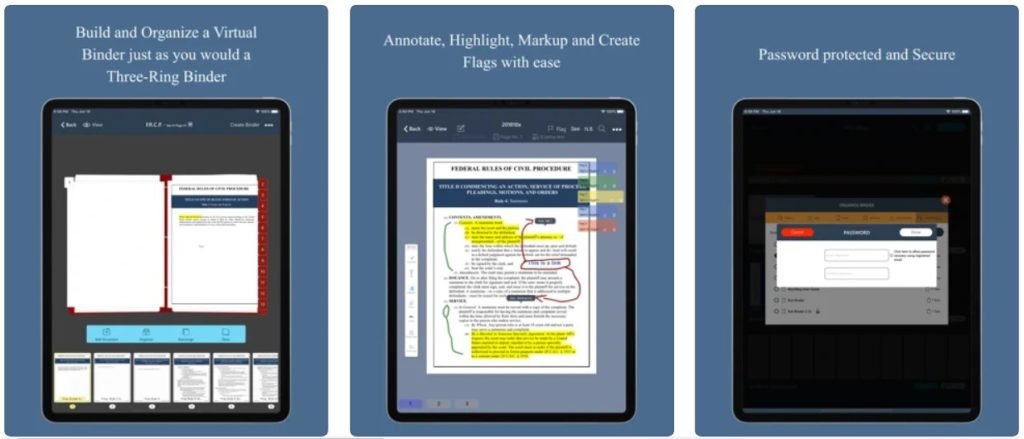
Features of MyLitBag
- Create tabbed binders and organize your materials into case files.
- Rearrange papers in existing binders and renumber tabs automatically.
- Utilize consecutively numbered tabs to move between documents quickly.
- You may bookmark pages and go to them with a single-screen touch.
- Create internal “See” references to connect pages with a single click, or use the “Nota Bene” link to mark portions for future reference.
- Search by reference, case file, binder, or document, and filter by notations, annotations, and issue flags.
- Annotate PDFs using a choice of colors, typefaces, and font sizes by writing, highlighting, or typing.
- Send password-protected papers and binders electronically to both MyLitBag users and non-users.
- Password-protected binder and PDF documents.
How does the app work?
Create a virtual binder by downloading PDF materials into the MyLitBag app. MyLitBag enables users to navigate the virtual binder by flipping between numbered tabs, flagging relevant pages for fast reference, rearranging papers with a fingertip touch-and-drag, and adding functionality through active internal ‘See’ and “Nota Bene” reference links.
You may password-protect whole MyLitBag binders or individual PDF documents and securely transmit password-protected full MyLitBag binders to other users or a PDF version to non-users. Try it risk-free for seven days with our free trial offer.



No more mailing, printing, or lugging around cumbersome binders. MyLitBag is an iPad legal document binder application built on the iOS platform that enables users to create, annotate, share, and manage a virtual library of binders and case files from anywhere and at any time.
MyLitBag is the best case management tool for lawyers and law firms. It was created by and for litigators. It has the same characteristics and capabilities as constructing and utilizing a three-ring legal document binder but is more secure, cost-effective, and time-efficient.
Your purchase includes eight complimentary emails and complimentary copies of the Federal Rules of Evidence and Civil Procedure. Additional monthly email subscriptions are offered within the app.
Frequently Asked Questions
- How may it be used?
Organize Shelves, Binders, and Case Files alphabetically, chronologically, or reverse-chronologically. Distribute-Email binders to colleagues, clients, and other MyLitBag users and non-users. Search-Filter by N.B./See references, annotations, and issue flags when searching by reference, case file, binder, or document.
Secure-Hold thousands of password-protected legal document binders delivered securely in minutes and lightweight enough to be lifted with two fingers. Create-Create tabbed binders and organize them into case files. Reorganize-With ease, you may annotate, highlight, markup, add flags, and rearrange existing binders.
- What permissions does the app require to sign you up?
The app has access to the location and may utilize it to determine a network-based position that is approximate. Additionally, it verifies that your network connection has sufficient bandwidth. It connects to Bluetooth devices, and so requires authorization. It enables access to Bluetooth settings. The app has unfettered access to the network. At starting, the software controls vibration and prevents the smartphone from resting.
- Is the software accessible for in-app purchases?
Download the MyLitBag iPad app from the app store to begin your free trial. Your paid subscription will commence after seven days. Our silver, gold, or platinum plans are available to you. Visit the app store on your iPad for more information.
- Which devices is the app compatible with?
The app supports only iPhones running iOS 11.1 or later. It is also compatible with the iPod touch, albeit iOS 11.1 or above is required. The program is also compatible with Macs; macOS 11.0 or later is required, as is a Mac equipped with an Apple M1 chip.
- Which languages is the app available in?
The software is available in two languages: English and Spanish.
Also Checkout: A quick look charting the rise of Flexepin