• About   |
  • Submit Guest Post |
  • Contact Us
No Result
View All Result
The Second Angle (TSA Magazine)
Advertise
  • Infotainment
    • Sports
    • People
    • Inspiring
  • Entertainment
    • Lifestyle
    • Home & Decoration
  • Buzz
  • Education
  • Travel
  • Finance
  • Healthcare
  • Technology
The Second Angle
No Result
View All Result
  • Infotainment
  • Entertainment
  • Buzz
  • Education
  • Travel
  • Finance
  • Healthcare
  • Technology
Advertisement
ADVERTISEMENT
Home Technology

Microsoft Has Made It Easier To Change The Default Browser In Windows 11

In Windows 11, Microsoft has finally made it simpler to change your default browser. This week, a new update (KB5011563) was released that allows Windows 11 users to change their default browser with a single click. This new one-click technique is being sent out to all Windows 11 users after being tested in December.

TSA Desk by TSA Desk
December 16, 2022
in Technology
Reading Time: 3 mins read
Microsoft Has Made It Easier To Change The Default Browser In Windows 11

Extreme Tech

Share on FacebookShare on WhatsApp
Advertisement Advertisement Advertisement
ADVERTISEMENT

Initially, Windows 11 did not provide a straightforward button for switching between default browsers, which was always present in Windows 10. Instead, Windows 11 users were compelled to modify individual file extensions or protocol handlers for HTTP, HTTPS,.HTML, and.HTM, or mark a button that only displayed when you clicked a link from outside a browser.

Microsoft defended its decision to make switching defaults more difficult, but rival browser makers such as Mozilla, Brave, and even Google’s Chrome head slammed Microsoft’s approach.

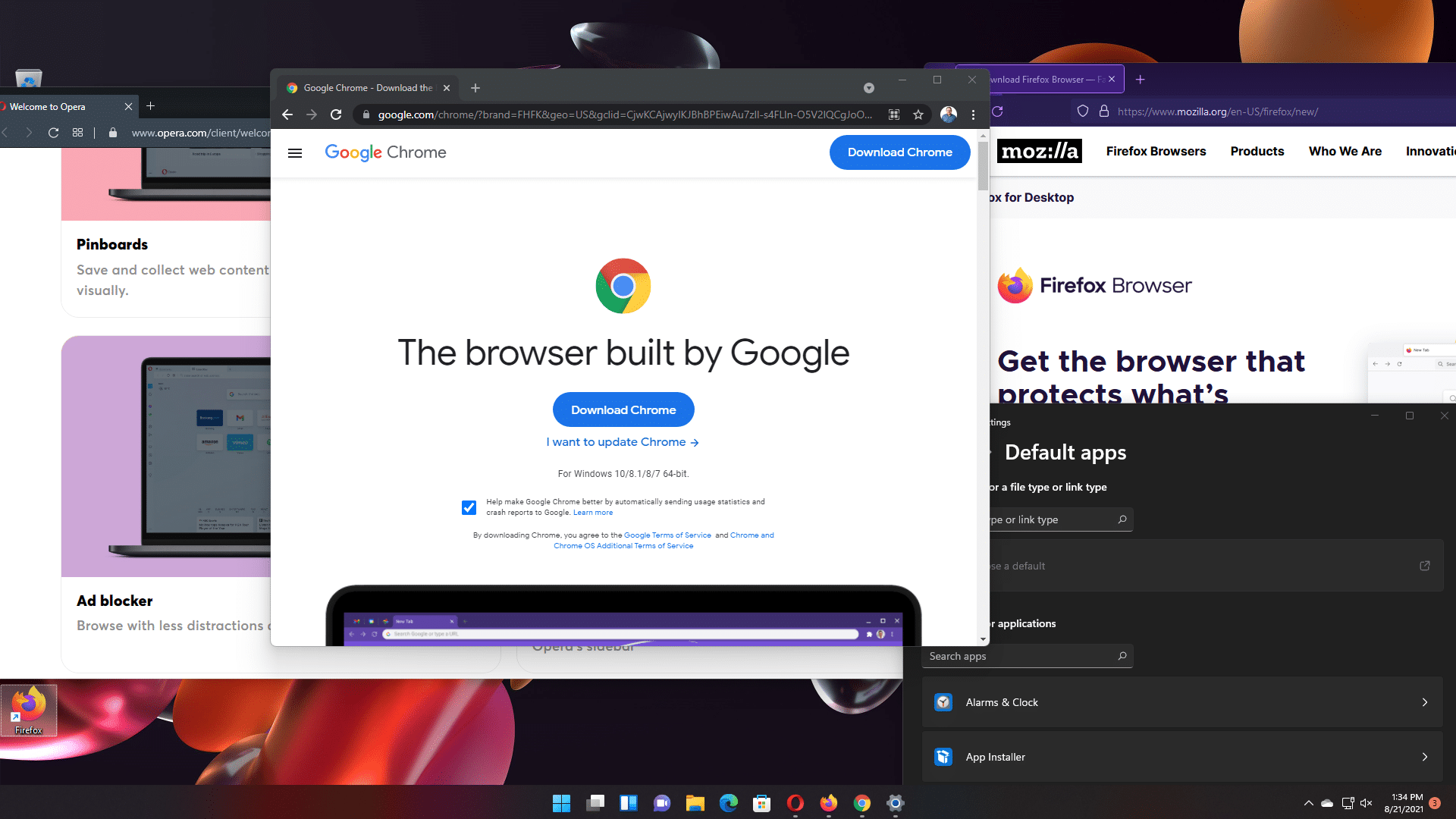
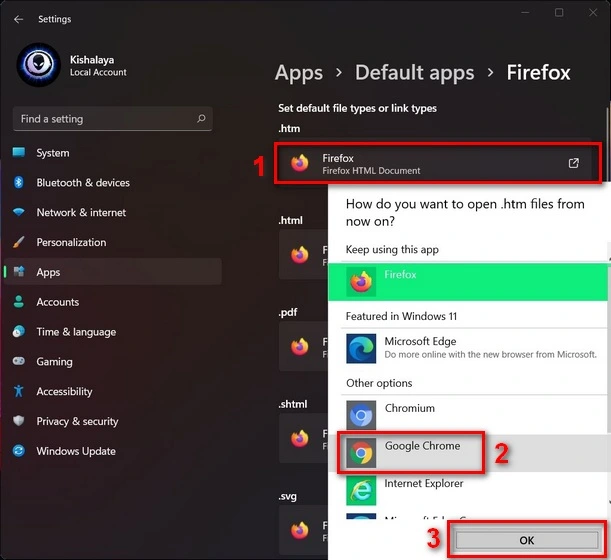
In the most recent update to Windows 11, you can now go to the default programs area, search for your preferred browser, and then click a box asking whether you want to make it the default. All of the work of changing file handlers is done in a single click, which is a significant improvement over what was previously available.

Microsoft Has Made It Easier To Change The Default Browser In Windows 11
Image Source: toms hardware
Table of Contents
  • STEPS TO CHANGE DEFAULT BROWSER 
  • CONCLUSION 

STEPS TO CHANGE DEFAULT BROWSER 

Microsoft definitely listened to input and criticism on the changes made in Windows 11. The software company continues to develop Windows 11 on a regular basis, with upgrades like these and larger modifications like Android applications and improvements to the user interface.

RelatedPosts

7 Conspiracy Theories That You Would Definitely Want To Believe In

Can You Download Videos From Facebook?

7 Most Futuristic Concept Cars in the World

7 Most Futuristic Concept Cars in the World

If you go to the default apps page (Settings -> Apps -> Default apps) and choose a browser from the app list, such as Google Chrome or Vivaldi, you’ll now notice an option at the top of the Settings page that allows you to designate it as your default browser.

This will convert all web browsing-related associations to that browser at once, saving you the hassle of changing it for each file type or protocol individually.
Microsoft Has Made It Easier To Change The Default Browser In Windows 11
Image Source: beebalm

Microsoft began testing this change with Insiders in the Dev channel in December, and it wasn’t immediately apparent how it would be implemented, but it appears that you won’t have to wait for a major feature update.

It’s a positive move, given that the previous system required browser manufacturers like Mozilla to skirt Microsoft’s requirements in order to make it simpler for consumers to change their preferred browser.

If you want to change your default browser right now, all you have to do is check for updates in the Windows 11 Settings app (in the Windows Update area) and download and install the optional update KB5011563. If you don’t mind waiting a little longer, this update should be incorporated in next month’s Patch Tuesday, which will be held on April 12th. Because it will be an obligatory update, most users will most likely receive it at that time.

CONCLUSION 

Microsoft is presently testing this new system with an optional upgrade, but unless a last-minute issue is discovered, the change should be available to everyone with an obligatory security update in April.

As others have pointed out, Microsoft’s argument was completely implausible. Clearly, the decision to complicate the procedure was made to ensure that Edge stays the default browser on Windows 11. Google, on the other hand, is guilty of using very similar strategies.

In the browser battles, Google is also taking aim at Microsoft’s respective user base, putting adverts on services such as Search and Gmail in an attempt to entice Microsoft Edge users to switch to Google.

Currently, Windows 11 users do not have a dedicated button for changing the default browser. Instead, users must set the default app for each type of extension (.htm, Html, webp, etc.). This is a time-consuming procedure, and many users leave Microsoft Edge as the default program.

Recently, Microsoft’s Edge browser was detected with a message targeted at diverting consumers away from its main competition, Google Chrome. “Are you still using Google Chrome?” That’s so 2008!” reads the message, along with several similar requests.

Also Checkout: Top 10 Trading Apps In Canada
ShareSendTweet

Related Posts

7 Conspiracy Theories That You Would Definitely Want To Believe In
Technology

Can You Download Videos From Facebook?

500 million people view millions of videos on Facebook every day. Some Facebook users wish to save their favorite videos...

Read moreDetails
7 Most Futuristic Concept Cars in the World
Technology

7 Most Futuristic Concept Cars in the World

Concept cars are no longer only a showpiece to draw attention to an automotive company. This is true technological brilliance....

Read moreDetails
What Makes GPT-4 Unique From ChatGPT And How Is It Different?
Technology

What Makes GPT-4 Unique From ChatGPT And How Is It Different?

With inception of new versions and other competitive AI chatbots, there arises a question — What makes GPT-4 Unique From...

Read moreDetails
20 Most Amazing And Genius Product Packaging Designs Ever Created
Technology

20 Most Amazing And Genius Product Packaging Designs Ever Created

The majority of our items are packaged in some style. Certain products don't require as much packing because customers will...

Read moreDetails
7 Most Expensive Cars In The World
Listicles

7 Most Expensive Cars In The World

Cars have been defined as a symbol of both luxury and status. While most of us are using our cars...

Read moreDetails
Top Examples Of Interactive Marketing & How Brands Can Make The Most Of It
Business

Top Examples Of Interactive Marketing & How Brands Can Make The Most Of It

In today's fast-paced digital age, companies must continually find new ways to engage with consumers. One increasingly popular approach is...

Read moreDetails
Load More

Leave a Reply Cancel reply

Your email address will not be published. Required fields are marked *

Important Links

  • About
  • Guest Post
  • Privacy Policy
  • Terms
  • Contact Us
  • Newsletter

© 2017-23. The Second Angle. All Rights Reserved. Developed and Managed by SquareBase.io

Welcome Back!

Login to your account below

Forgotten Password? Sign Up

Create New Account!

Fill the forms below to register

All fields are required. Log In

Retrieve your password

Please enter your username or email address to reset your password.

Log In
No Result
View All Result
  • Infotainment
    • Sports
    • People
    • Inspiring
  • Entertainment
    • Lifestyle
    • Home & Decoration
  • Buzz
  • Education
  • Travel
  • Finance
  • Healthcare
  • Technology

© 2017-23. The Second Angle. All Rights Reserved. Developed and Managed by SquareBase.io

This website uses cookies. By continuing to use this website you are giving consent to cookies being used. Visit our Privacy and Cookie Policy.