


• About   |
  • Advertise |
  • Contact Us
No Result
View All Result
The Second Angle (TSA Magazine)
Advertise
  • Infotainment
    • Sports
    • People
    • Inspiring
  • Entertainment
    • Lifestyle
    • Home & Decoration
  • Buzz
  • Education
  • Travel
  • Finance
  • Healthcare
  • Technology
The Second Angle
No Result
View All Result
  • Infotainment
  • Entertainment
  • Buzz
  • Education
  • Travel
  • Finance
  • Healthcare
  • Technology
Advertisement Advertisement Advertisement
ADVERTISEMENT
Home Technology

How To Deactivate Or Delete Your Snapchat Account

Snapchat is without a doubt one of the most popular social media platforms among millennials. Here’s an easy guide on How to Deactivate or Delete Your Snapchat Account.

by TSA Desk
April 27, 2023
in Technology
Reading Time: 3 mins read
How To Deactivate Or Delete Your Snapchat Account

Techvocast

Share on FacebookShare on WhatsApp
Advertisement Advertisement Advertisement
ADVERTISEMENT
4 min readGAdd The Second Angle as a preferred source on Google
Key takeaways
STEPS TO DEACTIVATE or DELETE YOUR SNAPCHAT ACCOUNT: Step 1: Navigate to Snapchat's web browser.STEPS TO DOWNLOAD SNAPCHAT DATA: Every Snapchat user should remember that before uninstalling the app, you must download the data or else you...What can you get from a Snapchat account?: Snapchat users may download data from the app in addition to photographs and videos.How Do I Reactivate My Snapchat Account?: Snapchat does not immediately erase the account.

Snapchat is without a doubt one of the most popular social media platforms among millennials. It’s a site where users may share photos with their friends by applying various effects.  In this post, we present an easy guide on how to deactivate or delete your Snapchat account.

Though its popularity has waned over time, with fewer users than Instagram and Facebook, many people still use Snapchat to take images, record movies with catchy filters, and keep a streak with pals.

How to Deactivate or Delete Your Snapchat Account
image source: wallpaper access

However, if you are no longer using your Snapchat account and are seeking simple methods to delete and deactivate it, we have you covered. In this post, we will walk you through the process of deleting, deactivating, and securing your data kept on the Snapchat platform.
5 Best Web Browsers For Android TVAlso read5 Best Web Browsers For Android TV
Table of Contents
  • STEPS TO DEACTIVATE or DELETE YOUR SNAPCHAT ACCOUNT 
  • STEPS TO DOWNLOAD SNAPCHAT DATA
  • What can you get from a Snapchat account?
  • How Do I Reactivate My Snapchat Account?

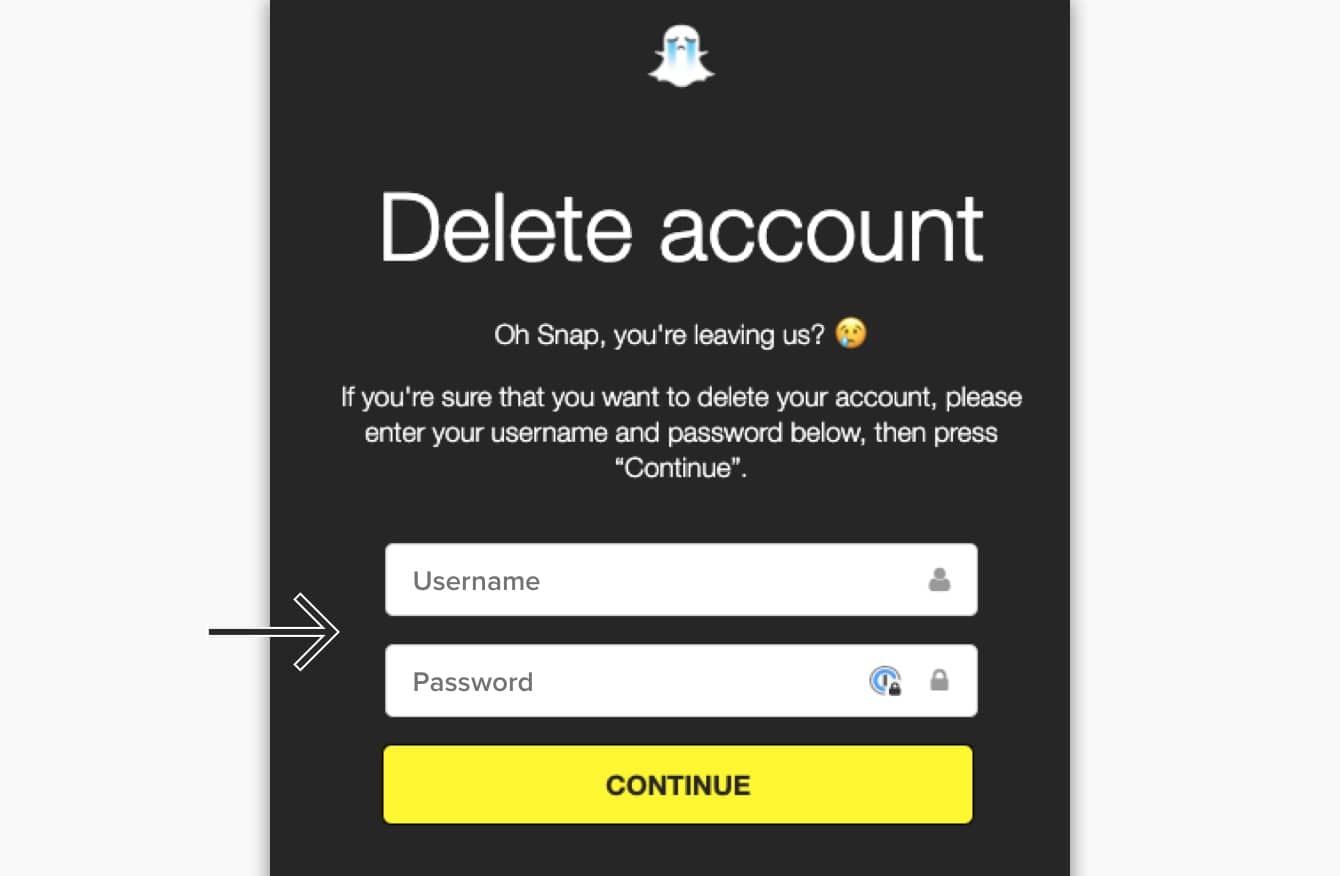
STEPS TO DEACTIVATE or DELETE YOUR SNAPCHAT ACCOUNT 

How to Deactivate or Delete Your Snapchat Account
image source: expression

Step 1: Navigate to Snapchat’s web browser.

Step 2: Access your account.

Step 3: On the Manage My Account page, click ‘Delete my Account.’

Step 4: Confirm your choice by entering your login and password again.

Step 5: Press the Continue button.

Step 6: Try logging in again to check the status of your account.

If you wish to completely remove and deactivate your account, you must not log into the app for 30 days after you deactivate it. You can only remove your Snapchat account using the Snapchat web browser. Before you completely deactivate your Snapchat account, make a backup of your Snapchat data.

STEPS TO DOWNLOAD SNAPCHAT DATA
How to Deactivate or Delete Your Snapchat Account
image source: online

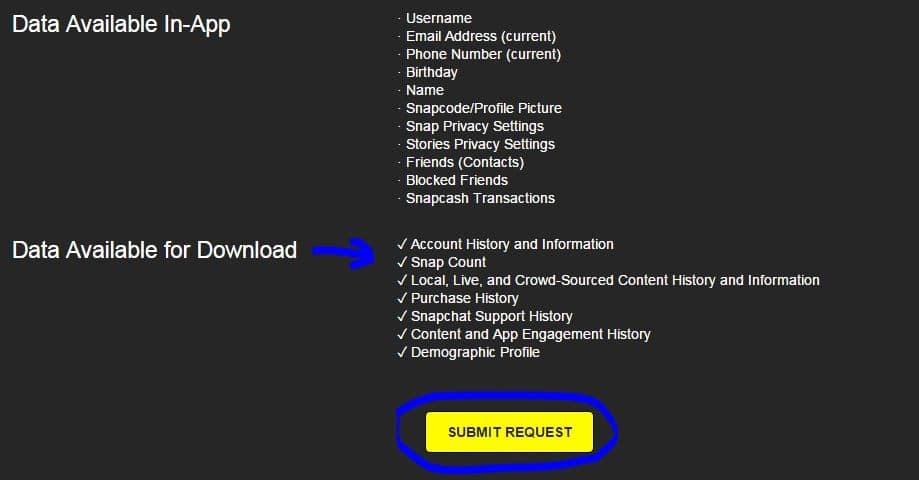
Every Snapchat user should remember that before uninstalling the app, you must download the data or else you will lose it. Follow these simple steps to extract all of the data available on Snapchat:

Step 1: Open a web browser and navigate to your Snapchat account.

Step 2: Enter your login and password.

Step 3: Now, on the Manage My Account page, navigate to the My Data area.

Step 4: At the bottom of the page, click Submit request.

Step 5: Snapchat will then send you an email to your registered email address.

Step 6: To get Snapchat data, click on the link.

Step 7: All of the data will be saved on your device in the form of a zip file.

What can you get from a Snapchat account?

Snapchat users may download data from the app in addition to photographs and videos. Login history and account information, user profile details, snap and conversation history, memories, Bitmoji, and many other things may be obtained from Snapchat.

Before removing the app, you may also download the purchase and shopping history, Snapchat support history, and location data.

How Do I Reactivate My Snapchat Account?
How to Deactivate or Delete Your Snapchat Account
image source: youtube

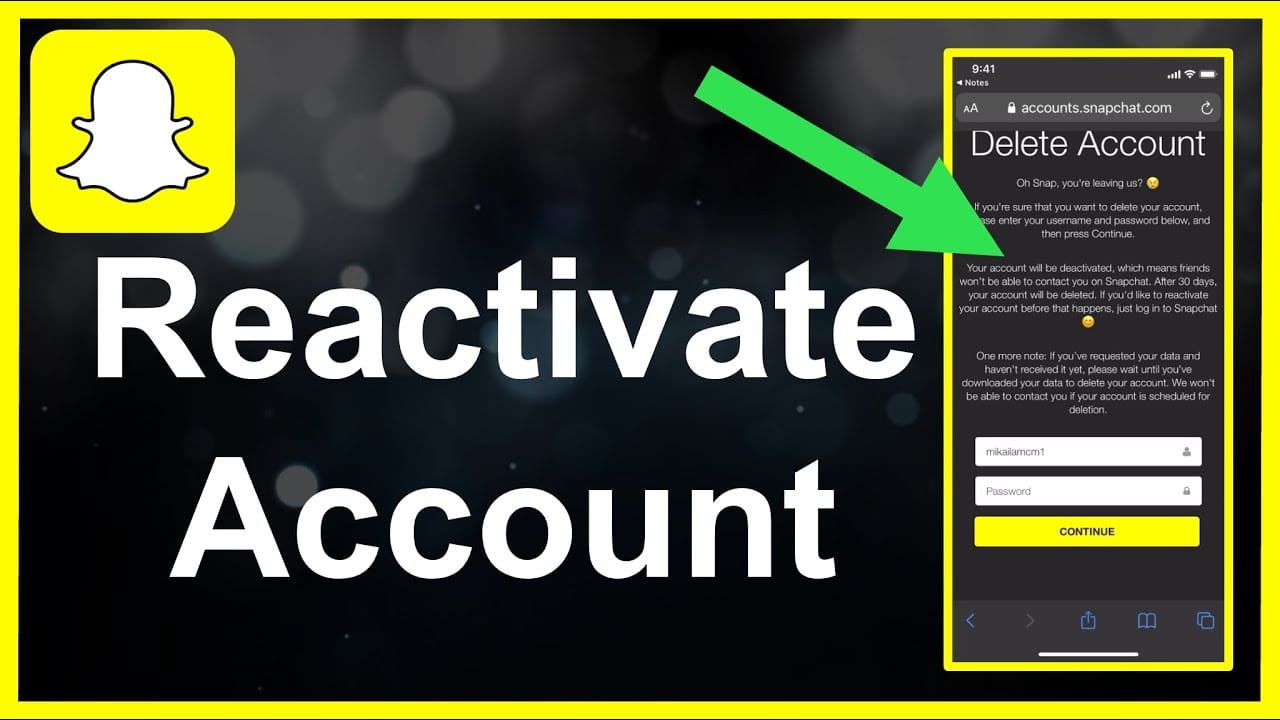
Snapchat does not immediately erase the account. It gives you 30 days before permanently deleting your account. If you change your mind and desire to return to this social networking site with all of your data and prior information, here are some measures you may do.

  • All you have to do to reinstate your Snapchat account is log in within 30 days after its cancellation. This will guarantee that your account is reactivated and all of your data is recovered.
  • The user must log in with their existing password. After the account has been deactivated, you are unable to modify or reset your password.
  • When the account has been deactivated After submitting the request, it may take up to 24 hours to reactivate the account and recover the data.
  • After the 30-day period, no one may revive their accounts.

Also check out: 5 Best Web Browsers For Android TV

Enjoyed this story?Share it with your friends
WhatsAppLinkedInXFacebookEmail
See more TSA Mag stories on GoogleAdd us as a preferred source and our stories will show up more often in your Top Stories.
GAdd The Second Angle as a preferred source on Google
ShareSend
Tweet
Previous Post

10 Of The Best French Shows On Netflix That You Shouldn’t Miss

Next Post

China warns U.S., S. Korea against ‘provoking confrontation’ with N. Korea

Related Posts

10 Useful Gadgets for Everyday Life in India (2026 Picks)
Technology

10 Useful Gadgets for Everyday Life in India (2026 Picks)

Useful gadgets for everyday life in India: 65W GaN charger, power bank, smart plug, JioTag, Kindle and more, with prices...

Read moreDetails
Person checking a laptop screen for signs that their email address was exposed in a data breach
Technology

How to Check If Your Email Was in a Data Breach (2026 Guide)

How to check if your email was in a data breach using Have I Been Pwned, Google, Apple and Mozilla...

Read moreDetails
Customer scanning a UPI QR code with a smartphone to make a small payment
Technology

What Is UPI Lite Limit in 2026? Wallet, Payment Caps and Setup

What is UPI Lite limit in 2026: Rs 1,000 per payment and Rs 5,000 balance. How to enable it, auto...

Read moreDetails
Smartphone showing mobile network settings used to add an eSIM in India
Technology

How to Activate eSIM in Jio, Airtel and Vi: Step-by-Step Guide

How to activate eSIM in Jio, Airtel and Vi: check phone support, follow official app steps, know the charges, switch...

Read moreDetails
10 Best Free Productivity Apps in 2026 and What Each Plan Offers
Technology

10 Best Free Productivity Apps in 2026 and What Each Plan Offers

The best free productivity apps in 2026, including Notion, Todoist, Trello and Obsidian, with free plan limits checked on each...

Read moreDetails
A man in Bengaluru looking at his smartphone
Technology

DigiLocker Guide: How to Use It and Which Documents Are Valid

A simple DigiLocker guide for India: how to sign up, fetch your PAN, driving licence and marksheets, share them safely,...

Read moreDetails
Load More
Next Post
China warns U.S., S. Korea against ‘provoking confrontation’ with N. Korea

China warns U.S., S. Korea against 'provoking confrontation' with N. Korea

About

The Second Angle

The Second Angle (TSA Mag) is an infotainment and lifestyle magazine covering entertainment, travel, technology, health, education and finance.

Important Links

  • About The Second Angle
  • Advertise With Us
  • Editorial Policy
  • Privacy Policy
  • Terms and Conditions
  • Contact Us
  • Careers
  • Newsletter

Explore

  • Infotainment
  • Entertainment
  • Buzz
  • Education
  • Travel
  • Finance
  • Healthcare
  • Technology
Advertise with us

© 2017-2026. The Second Angle. All Rights Reserved. Developed and Managed by Squarebase.io

Welcome Back!

Login to your account below

Forgotten Password?

Retrieve your password

Please enter your username or email address to reset your password.

Log In
No Result
View All Result
  • Infotainment
    • Sports
    • People
    • Inspiring
  • Entertainment
    • Lifestyle
    • Home & Decoration
  • Buzz
  • Education
  • Travel
  • Finance
  • Healthcare
  • Technology

© 2017-2026. The Second Angle. All Rights Reserved. Developed and Managed by Squarebase.io

We use cookies to keep TSA fast and relevant. Read our Privacy Policy.





