


• About   |
  • Advertise |
  • Contact Us
No Result
View All Result
The Second Angle (TSA Magazine)
Advertise
  • Infotainment
    • Sports
    • People
    • Inspiring
  • Entertainment
    • Lifestyle
    • Home & Decoration
  • Buzz
  • Education
  • Travel
  • Finance
  • Healthcare
  • Technology
The Second Angle
No Result
View All Result
  • Infotainment
  • Entertainment
  • Buzz
  • Education
  • Travel
  • Finance
  • Healthcare
  • Technology
Advertisement Advertisement Advertisement
ADVERTISEMENT
Home Technology

How To Check And Display The CPU Temperature In Windows 11 ( Step-By-Step)

Most objects have a temperature range within which they operate efficiently. When internal temperatures rise, your computer is just as likely as your body to fail. Lets see How To Check And Display The CPU Temperature In Windows 11.

by TSA Desk
June 11, 2022
in Technology
Reading Time: 3 mins read
CPU Temperature

Image Source: okaygotcha

Share on FacebookShare on WhatsApp
Advertisement Advertisement Advertisement
ADVERTISEMENT
4 min readGAdd The Second Angle as a preferred source on Google
Key takeaways
Method No. 1: Using BIOS/UEFI: Unfortunately, there is no native option in Windows 11 to check CPU temperatures.How to Access the BIOS in Windows 11: Here are two simple ways to access the BIOS on your Windows PC.Option 1.1: When the machine boots up, use a hotkey to access the BIOS.: When your PC or laptop boots up, there is a little gap between the logo appearance and the...Option 1.2: Launch BIOS from the Windows Start menu (via advanced boot menu): Press the Start button and then the Power button.Why should you keep an eye on your CPU temperature?: The CPU is the heart of your computer, the puppet master who controls the whole show in the...

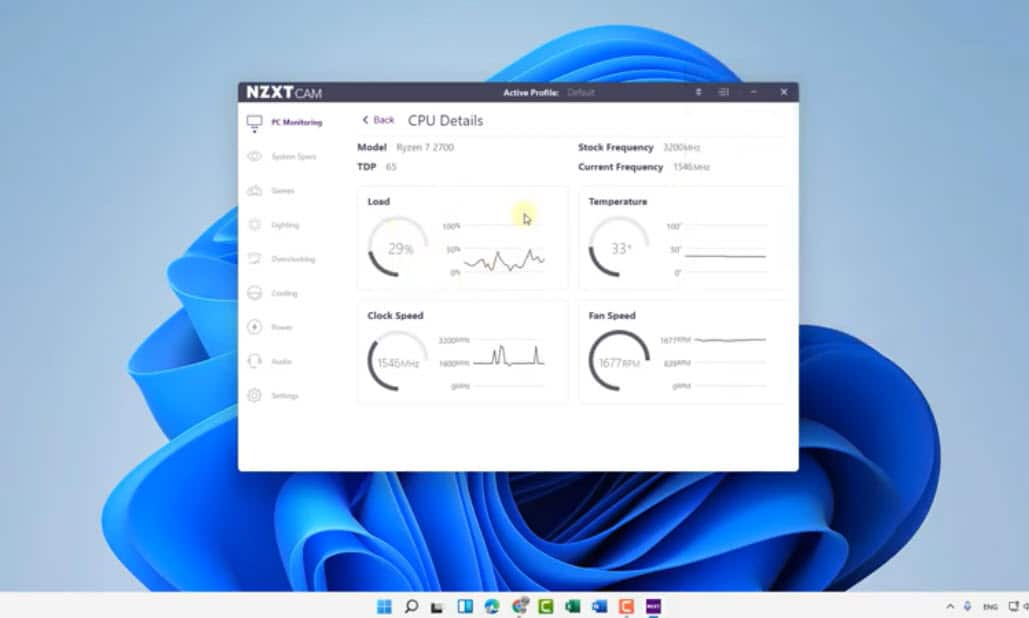
The CPU, or the brain of your computer, is one of the most important components of your PC. If this is thermally throttled, awful things are likely to happen. Monitor your CPU temperatures, especially if you can feel heat decanting through to you, and take the appropriate actions to regulate it. Everything you need to know about How To Check And Display The CPU Temperature In Windows 11 is given here. 

You may inspect the raw output produced by your PC’s motherboard via the BIOS, eliminating the need for a program when you’re truly interested. When you don’t need to be a computer genius, checking the CPU temperature using the app will suffice. Check out all of the ways listed below.
CPU Temperature
Image Source: itechhacks
Table of Contents
  • Method No. 1: Using BIOS/UEFI
  • How to Access the BIOS in Windows 11
  • Option 1.1: When the machine boots up, use a hotkey to access the BIOS.
  • Option 1.2: Launch BIOS from the Windows Start menu (via advanced boot menu)
  • Why should you keep an eye on your CPU temperature?
  • CONCLUSION 

Method No. 1: Using BIOS/UEFI

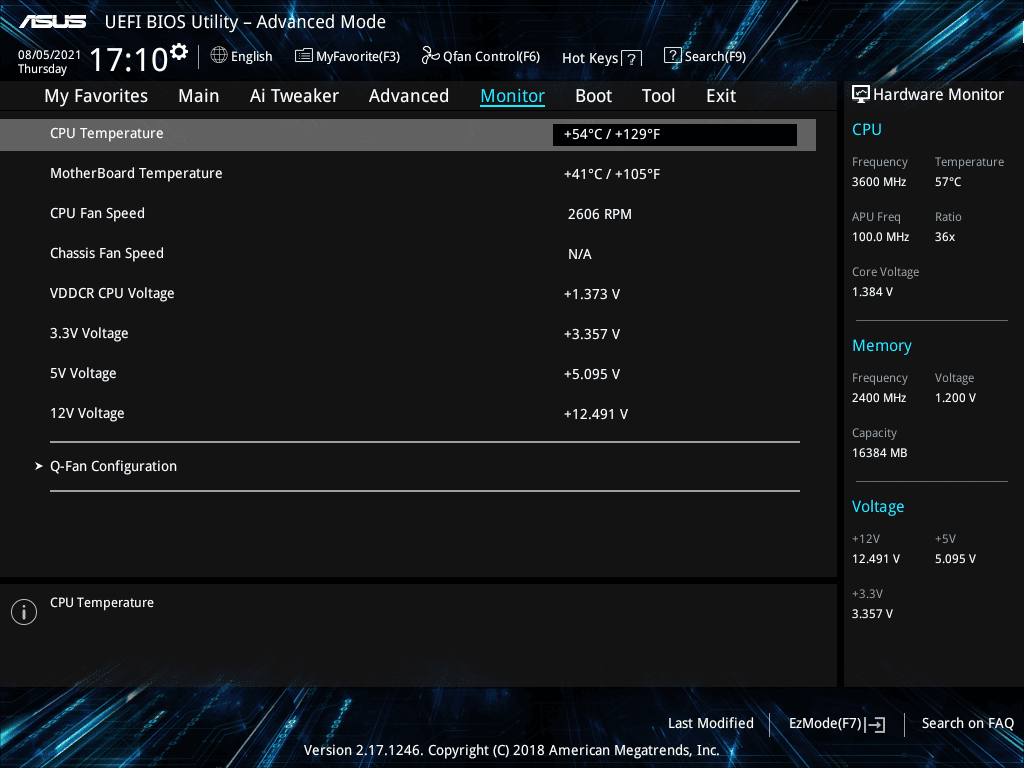
Unfortunately, there is no native option in Windows 11 to check CPU temperatures. Instead, you must check your system’s thermal state in the BIOS / UEFI of your PC. This provides you with the right information. Here’s how to proceed:

Top 9 Cool Gadgets To Buy In 2022Also readTop 9 Cool Gadgets To Buy In 2022

How to Access the BIOS in Windows 11

Here are two simple ways to access the BIOS on your Windows PC. And, sure, you only need to access the BIOS panel to view the CPU temperature. There is nothing further that has to be done. So, when your computer boots up, enter the BIOS panel by hitting the right hotkey or utilising the Start Menu. Both strategies are detailed in detail below. 

Option 1.1: When the machine boots up, use a hotkey to access the BIOS.

When your PC or laptop boots up, there is a little gap between the logo appearance and the Windows start-up screen when you must repeatedly press the hotkey that is particular to your system maker
How To Check And Display The CPU Temperature In Windows 11 ( Step-By-Step)
Image Source: partitionwizard

When you hit the hotkey, your system will take you to the UEFI / BIOS page rather than the standard Windows-up page. To open the boot menu, use the shortcut keys DEL or, more commonly, F2. The F1 key is used to boot up Lenovo PCs and Thinkpads.

Option 1.2: Launch BIOS from the Windows Start menu (via advanced boot menu)

Press the Start button and then the Power button. Then, while holding down the ‘Shift’ key, press the Restart button.Your computer will restart and display the advanced boot screen. Navigate to Troubleshooting.

  • Select Advanced Settings.
  • UEFI Firmware Settings should be selected.
  • Select Restart.
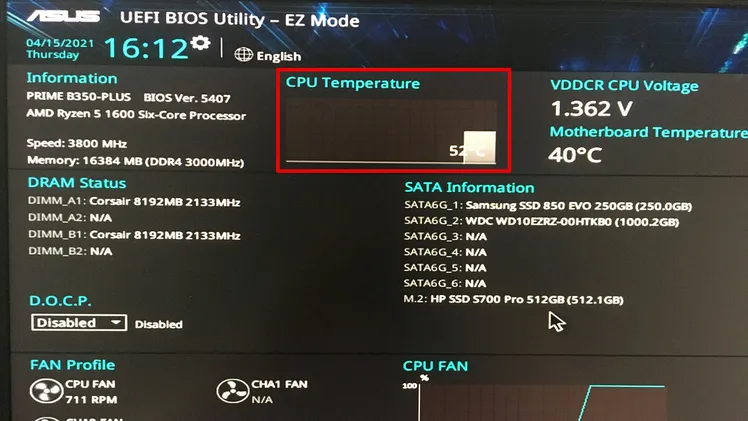
  • You will now be brought to a page where you may check the state of your PC, run component tests, and verify system information and diagnostics. They will very certainly involve temperature checks as well.
    CPU Temperature
    Image Source: okaygotcha

Why should you keep an eye on your CPU temperature?

The CPU is the heart of your computer, the puppet master who controls the whole show in the background, receiving commands and dispensing the processing power necessary to keep everything running. And its interior temperatures must be checked on a regular basis to guarantee that the show does not go up in flames. Higher-than-average thermals inevitably result in a significant decrease in performance, an increased chance of accidents, and, finally, total mortality. Knowing the precise CPU temperatures will allow you to take the necessary actions at the appropriate moment to control the problem.

CONCLUSION 

Finally, I hope you found the post How To Check And Display The CPU Temperature In Windows 11 useful. If you have any questions about this article, please contact us. Also, please Write your reviews and the problem you faced because of your CPC Temperature, you should keep an eye on your CPC Temperature and must take appropriate action to control your temperature and follow the prescribed steps to show or control the temperature.

Also Checkout: Top 9 Cool Gadgets To Buy In 2022

Source: Techidroid 

Enjoyed this story?Share it with your friends
WhatsAppLinkedInXFacebookEmail
See more TSA Mag stories on GoogleAdd us as a preferred source and our stories will show up more often in your Top Stories.
GAdd The Second Angle as a preferred source on Google
ShareSend
Tweet
Previous Post

Kendall Jenner Net Worth-Early Life, Career, Controversy, Quotes, Unknown Facts

Next Post

2022 Indian presidential election on July 18th: Election commission

Related Posts

LinkedIn logo sculpture at the LinkedIn office in Mountain View
Technology

How to Remove a Job Post on LinkedIn: Close It on Desktop or App

LinkedIn job posts cannot be deleted, only closed. Step-by-step instructions to close a job post on desktop and the LinkedIn...

Read moreDetails
10 Useful Gadgets for Everyday Life in India (2026 Picks)
Technology

10 Useful Gadgets for Everyday Life in India (2026 Picks)

Useful gadgets for everyday life in India: 65W GaN charger, power bank, smart plug, JioTag, Kindle and more, with prices...

Read moreDetails
Person checking a laptop screen for signs that their email address was exposed in a data breach
Technology

How to Check If Your Email Was in a Data Breach (2026 Guide)

How to check if your email was in a data breach using Have I Been Pwned, Google, Apple and Mozilla...

Read moreDetails
Customer scanning a UPI QR code with a smartphone to make a small payment
Technology

What Is UPI Lite Limit in 2026? Wallet, Payment Caps and Setup

What is UPI Lite limit in 2026: Rs 1,000 per payment and Rs 5,000 balance. How to enable it, auto...

Read moreDetails
Smartphone showing mobile network settings used to add an eSIM in India
Technology

How to Activate eSIM in Jio, Airtel and Vi: Step-by-Step Guide

How to activate eSIM in Jio, Airtel and Vi: check phone support, follow official app steps, know the charges, switch...

Read moreDetails
10 Best Free Productivity Apps in 2026 and What Each Plan Offers
Technology

10 Best Free Productivity Apps in 2026 and What Each Plan Offers

The best free productivity apps in 2026, including Notion, Todoist, Trello and Obsidian, with free plan limits checked on each...

Read moreDetails
Load More
Next Post
2022 Indian presidential election on July 18th: Election commission

2022 Indian presidential election on July 18th: Election commission

About

The Second Angle

The Second Angle (TSA Mag) is an infotainment and lifestyle magazine covering entertainment, travel, technology, health, education and finance.

Important Links

  • About The Second Angle
  • Advertise With Us
  • Editorial Policy
  • Privacy Policy
  • Terms and Conditions
  • Contact Us
  • Careers
  • Newsletter

Explore

  • Infotainment
  • Entertainment
  • Buzz
  • Education
  • Travel
  • Finance
  • Healthcare
  • Technology
Advertise with us

© 2017-2026. The Second Angle. All Rights Reserved. Developed and Managed by Squarebase.io

Welcome Back!

Login to your account below

Forgotten Password?

Retrieve your password

Please enter your username or email address to reset your password.

Log In
No Result
View All Result
  • Infotainment
    • Sports
    • People
    • Inspiring
  • Entertainment
    • Lifestyle
    • Home & Decoration
  • Buzz
  • Education
  • Travel
  • Finance
  • Healthcare
  • Technology

© 2017-2026. The Second Angle. All Rights Reserved. Developed and Managed by Squarebase.io

We use cookies to keep TSA fast and relevant. Read our Privacy Policy.





