


• About   |
  • Advertise |
  • Contact Us
No Result
View All Result
The Second Angle (TSA Magazine)
Advertise
  • Infotainment
    • Sports
    • People
    • Inspiring
  • Entertainment
    • Lifestyle
    • Home & Decoration
  • Buzz
  • Education
  • Travel
  • Finance
  • Healthcare
  • Technology
The Second Angle
No Result
View All Result
  • Infotainment
  • Entertainment
  • Buzz
  • Education
  • Travel
  • Finance
  • Healthcare
  • Technology
Advertisement Advertisement Advertisement
ADVERTISEMENT
Home Technology

How To Read And Recover Deleted WhatsApp Messages On Android

WhatsApp is the most widely used and downloaded instant messaging programme for Android, iOS, and desktop computers. Here’s How to Read and Recover Deleted WhatsApp Messages on Android

by TSA Desk
May 1, 2023
in Technology
Reading Time: 2 mins read
How To Read And Recover Deleted WhatsApp Messages On Android

HT Tech

Share on FacebookShare on WhatsApp
Advertisement Advertisement Advertisement
ADVERTISEMENT
2 min readGAdd The Second Angle as a preferred source on Google
Key takeaways
WhatsApp is the most widely used and downloaded instant messaging programme for Android, iOS, and desktop computers.WhatsApp long ago offered the ability to erase sent messages before they are read by the receiver.This solution is only applicable to Android cell phones; it is not applicable to iPhones or iPads.

WhatsApp is the most widely used and downloaded instant messaging programme for Android, iOS, and desktop computers. You can talk with your friends and family, create and interact in groups, send file attachments, and more with this software. In this post, you will learn How to Read and Recover Deleted WhatsApp Messages on Android.
How to Read and Recover Deleted WhatsApp Messages on Android
Image Source: webwise

WhatsApp long ago offered the ability to erase sent messages before they are read by the receiver. This is useful if you made a typing error or mistakenly delivered the message to the wrong recipient. The recipient, on the other hand, may experience the reverse effect, becoming even more inquisitive about what was delivered in the first place. Although you can’t access deleted messages on WhatsApp.

This solution is only applicable to Android cell phones; it is not applicable to iPhones or iPads. This technique will be carried out with the assistance of a third-party app having notification access.
Ups and Downs of Working Remotely – 3 Ups and 3 DownsAlso readUps and Downs of Working Remotely – 3 Ups and 3 Downs

This isn’t an official approach, and the app has nothing to do with WhatsApp. Because notification access is broad and potentially intrusive permission to give an app, consider your needs carefully before allowing it.

Table of Contents
  • Steps to Read and Recover Deleted WhatsApp Messages on Android
    • Using WAMR 

Steps to Read and Recover Deleted WhatsApp Messages on Android

Although there isn’t a direct way to read a deleted message, you can use a third-party programme to do so.

Using WAMR 
How to Read and Recover Deleted WhatsApp Messages on Android
Image Source: 99images

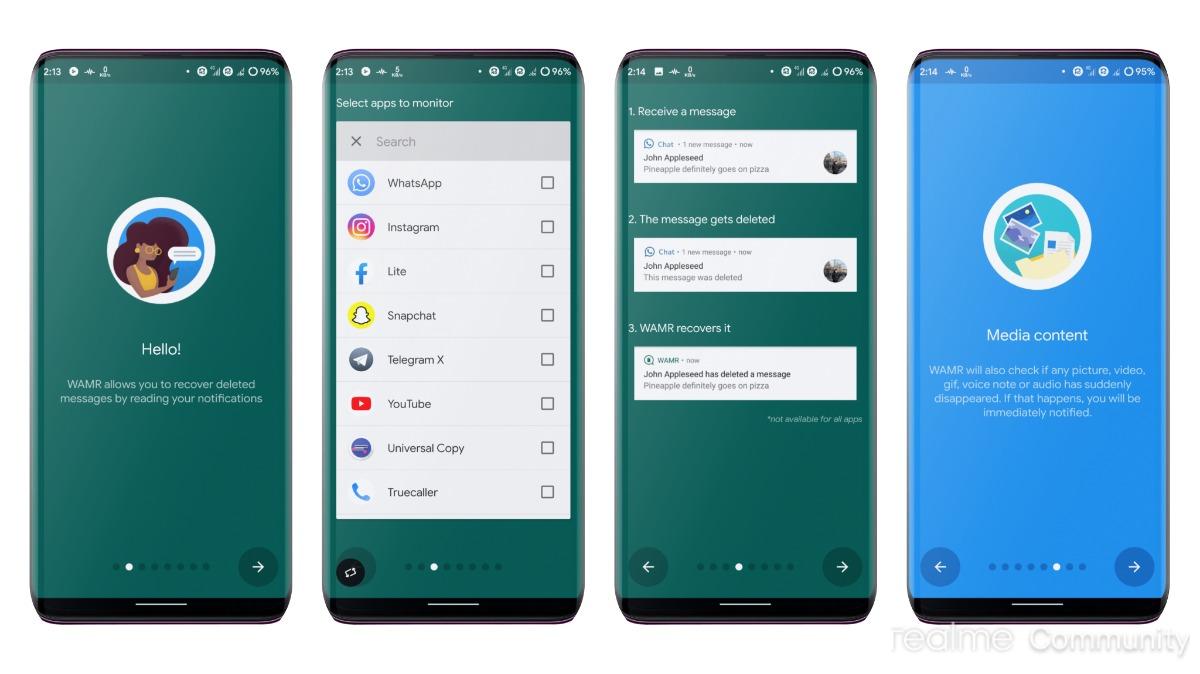
WAMR, on the other hand, is a programme that allows you to recover text messages and media attachments. It’s compatible with nearly every popular instant messaging programme, including WhatsApp. Here’s how to get started with the app.
How to Read and Recover Deleted WhatsApp Messages on Android
Image Source: static.c.realme
  1. To begin, go to the Google Play Store and download and install WAMR on your Android device.
  2. Open the app, read the terms and conditions, and accept them. When you’re finished, press the Next button.
  3. On the first screen, you’ll be prompted to choose which apps’ notifications you wish to keep track of. Select WhatsApp from the drop-down menu and then hit the next arrow button.

Also Checkout: Ups and Downs of Working Remotely – 3 Ups And 3 Downs

Enjoyed this story?Share it with your friends
WhatsAppLinkedInXFacebookEmail
See more TSA Mag stories on GoogleAdd us as a preferred source and our stories will show up more often in your Top Stories.
GAdd The Second Angle as a preferred source on Google
ShareSend
Tweet
Previous Post

‘Little Things’ Comes To An End: Not A Review

Next Post

Uzbekistan President wins nationwide referendum to rewrite Constitution 

Related Posts

Person checking a laptop screen for signs that their email address was exposed in a data breach
Technology

How to Check If Your Email Was in a Data Breach (2026 Guide)

How to check if your email was in a data breach using Have I Been Pwned, Google, Apple and Mozilla...

Read moreDetails
Customer scanning a UPI QR code with a smartphone to make a small payment
Technology

What Is UPI Lite Limit in 2026? Wallet, Payment Caps and Setup

What is UPI Lite limit in 2026: Rs 1,000 per payment and Rs 5,000 balance. How to enable it, auto...

Read moreDetails
Smartphone showing mobile network settings used to add an eSIM in India
Technology

How to Activate eSIM in Jio, Airtel and Vi: Step-by-Step Guide

How to activate eSIM in Jio, Airtel and Vi: check phone support, follow official app steps, know the charges, switch...

Read moreDetails
10 Best Free Productivity Apps in 2026 and What Each Plan Offers
Technology

10 Best Free Productivity Apps in 2026 and What Each Plan Offers

The best free productivity apps in 2026, including Notion, Todoist, Trello and Obsidian, with free plan limits checked on each...

Read moreDetails
A man in Bengaluru looking at his smartphone
Technology

DigiLocker Guide: How to Use It and Which Documents Are Valid

A simple DigiLocker guide for India: how to sign up, fetch your PAN, driving licence and marksheets, share them safely,...

Read moreDetails
A young person using a mobile phone
Technology

How to Block a Lost or Stolen Phone on Sanchar Saathi (CEIR)

Lost your mobile? Here is how to block a lost phone on Sanchar Saathi using CEIR, the documents you need,...

Read moreDetails
Load More
Next Post
Uzbekistan President wins nationwide referendum to rewrite Constitution 

Uzbekistan President wins nationwide referendum to rewrite Constitution 

About

The Second Angle

The Second Angle (TSA Mag) is an infotainment and lifestyle magazine covering entertainment, travel, technology, health, education and finance.

Important Links

  • About The Second Angle
  • Advertise With Us
  • Editorial Policy
  • Privacy Policy
  • Terms and Conditions
  • Contact Us
  • Careers
  • Newsletter

Explore

  • Infotainment
  • Entertainment
  • Buzz
  • Education
  • Travel
  • Finance
  • Healthcare
  • Technology
Advertise with us

© 2017-2026. The Second Angle. All Rights Reserved. Developed and Managed by Squarebase.io

Welcome Back!

Login to your account below

Forgotten Password?

Retrieve your password

Please enter your username or email address to reset your password.

Log In
No Result
View All Result
  • Infotainment
    • Sports
    • People
    • Inspiring
  • Entertainment
    • Lifestyle
    • Home & Decoration
  • Buzz
  • Education
  • Travel
  • Finance
  • Healthcare
  • Technology

© 2017-2026. The Second Angle. All Rights Reserved. Developed and Managed by Squarebase.io

We use cookies to keep TSA fast and relevant. Read our Privacy Policy.





