




The best free AutoCAD alternatives in 2026 are FreeCAD, LibreCAD, QCAD Community Edition, nanoCAD Free and SketchUp Free. Students and teachers can also get AutoCAD itself free for a year through Autodesk’s education plan. DraftSight, BricsCAD and SolidFace are now paid tools, but each offers a free trial and is marketed as a cheaper option.
Our earlier version of this list, written in 2022, called several paid programs free. Licences have changed since then, so we have checked each tool’s current terms on its official website or reference page. One tool from the old list, TrueCAD, has been dropped because we could not confirm its current status.
Free AutoCAD alternatives: quick comparison
| Software | Cost | 2D or 3D | DWG support |
|---|---|---|---|
| FreeCAD | Free, open source | 3D (with 2D drawings) | Limited, via ODA File Converter |
| LibreCAD | Free, open source | 2D | DXF native |
| QCAD Community Edition | Free, open source | 2D | DWG through paid plugin |
| nanoCAD Free | Free, no time limit | 2D | Native DWG |
| SketchUp Free | Free, non-commercial | 3D | Check current import options |
| AutoCAD Education | Free for eligible students and educators | 2D and 3D | Native DWG |
| DraftSight | Paid, 30-day trial | 2D (Premium adds more) | Native DWG |
| BricsCAD | Paid, 30-day trial | 2D and 3D | Native DWG |
| SolidFace | Paid, free trial | 2D and 3D parametric | DWG import |
Truly free AutoCAD alternatives
1. FreeCAD
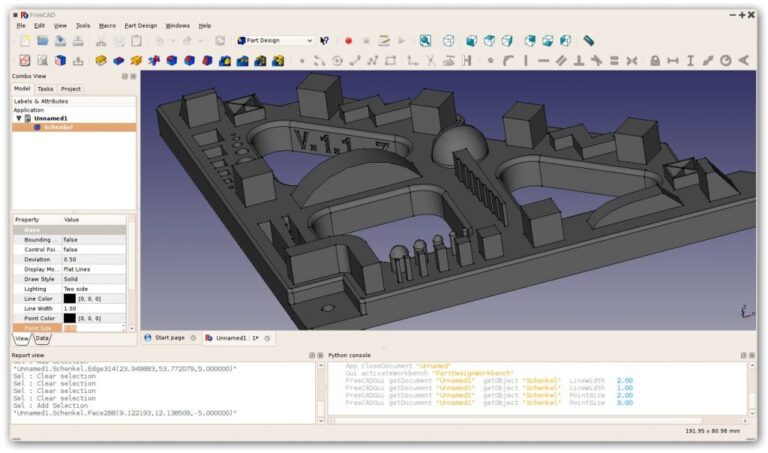
FreeCAD is an open-source parametric 3D modeller for Windows, macOS and Linux. Version 1.0 arrived on 18 November 2024, fixing a long-standing problem with how models update after edits and adding built-in Assembly and BIM workbenches. Version 1.1 followed on 24 March 2026.
 Also readWhatsApp, Telegram and Signal: Which Is Safer to Use in 2026?
It suits mechanical design, product design and architecture. Its TechDraw workbench creates 2D drawings from 3D models, but pure 2D drafting is not its main focus. DWG files can be imported and exported in a limited way through the free ODA File Converter.
2. LibreCAD
LibreCAD is a free, open-source 2D CAD program for Windows, macOS and Linux. It started around 2010 as a fork of QCAD Community Edition and uses DXF as its native format. The latest stable release, 2.2.1.4, came out on 3 March 2026.
It is a good choice for floor plans, simple mechanical drawings and learning the basics of drafting. It does not do 3D.
3. QCAD Community Edition
QCAD, made by RibbonSoft, is a 2D design and drafting tool. The Community Edition is open source under the GPL. QCAD Professional, which adds DWG support through a commercial plugin, works only for a limited time as a trial.
QCAD runs on Windows, macOS and Linux, and its interface is simple enough for beginners.

4. nanoCAD Free
nanoCAD works natively in DWG, the same format AutoCAD uses, which makes file sharing easier. Its official website says nanoCAD Free offers core 2D drafting tools with no time limit. Paid licences with more modules start at $289 a year, and students and teachers can apply for free licences.
5. SketchUp Free
SketchUp, owned by Trimble, is one of the easiest 3D modelling tools to learn. SketchUp Free runs in a web browser and was launched in November 2017. It cannot be used for commercial work and does not support extensions.
Professionals usually move to the paid Pro or Studio plans, which have been subscription-only since November 2020.
6. AutoCAD Education plan
Autodesk gives eligible students and educators free, one-year, single-user access to its software, including AutoCAD, for educational purposes. Access can be renewed each year while you remain eligible. It is meant for learning, so check Autodesk’s terms before using it for any paid project.
Low-cost AutoCAD alternatives with free trials
7. DraftSight
DraftSight, from Dassault Systemes, was once free for personal use, but that is no longer the case. Its official website now lists Professional, Premium and Enterprise editions, with a 30-day free trial. The company says it can cost up to 70% less than leading competitors.
8. BricsCAD
BricsCAD, developed by Bricsys (owned by Hexagon), works natively in DWG and runs on Windows, macOS and Linux. Editions range from Lite for 2D drafting to Pro, BIM, Mechanical and Ultimate. It is sold with perpetual licences as well as subscriptions, and a 30-day trial gives full access.
9. SolidFace
SolidFace is a parametric 3D CAD system with real-time collaboration, sketching, assemblies, drawings and simulation. It is no longer free: its website lists pricing of $99 a month or $999 a year, with a free trial. It can import DWG and DXF files.
How to choose the right AutoCAD alternative
- For 2D drafting on a zero budget: LibreCAD, QCAD Community Edition or nanoCAD Free.
- For 3D and product design: FreeCAD.
- For quick 3D concepts and interiors: SketchUp Free, if the work is non-commercial.
- For students: the Autodesk education plan, so you learn the industry-standard tool.
- For businesses needing full DWG compatibility: trial BricsCAD or DraftSight before buying.
Always check the licence terms on the official website before using any free tool for client work, as terms can change.
For more software guides, see our technology section. Course and career guides for design students are in our education section.
Further reading: TechiDroid.
Frequently asked questions
Is there a completely free alternative to AutoCAD?
Yes. FreeCAD, LibreCAD and QCAD Community Edition are free and open source, and nanoCAD Free offers basic 2D drafting with no time limit.
Is DraftSight still free?
No. DraftSight is now a paid product with a 30-day free trial, according to its official website.
Can students get AutoCAD for free?
Yes. Eligible students and educators get free one-year access to AutoCAD through Autodesk’s education plan, renewable while they stay eligible.
Which free CAD software opens DWG files?
nanoCAD works natively in DWG. FreeCAD can import a limited subset of DWG through the ODA File Converter.
Sources: Wikipedia: FreeCAD, DraftSight official site, nanoCAD official site, Autodesk Education.








